> ## Documentation Index
> Fetch the complete documentation index at: https://docs.userpilot.com/llms.txt
> Use this file to discover all available pages before exploring further.
# Set Subscription Preferences
> Unsubscribe or re-subscribe email addresses in Userpilot from your own systems, in batches of up to 1,000 records per request.
## **Overview**
Use this endpoint to keep email subscription preferences in sync between Userpilot and your own systems. When a user unsubscribes or re-subscribes through your CRM, marketing platform, or product, you can automatically update their status in Userpilot without manually uploading a file.
## **When to Use**
Use this endpoint when:
* Your CRM or marketing platform is the source of truth for email subscription preferences.
* You want subscription changes to sync automatically instead of relying on manual file uploads.
* You need to unsubscribe email addresses even if they are not yet associated with a Userpilot user.
For one-time updates that don’t require an integration, use the [**dashboard import**](/in-app-engagement/emails/manage-unsubscribes) instead
## Prerequisites
* Userpilot API Key from [Settings > Environment](https://run.userpilot.io/environment)
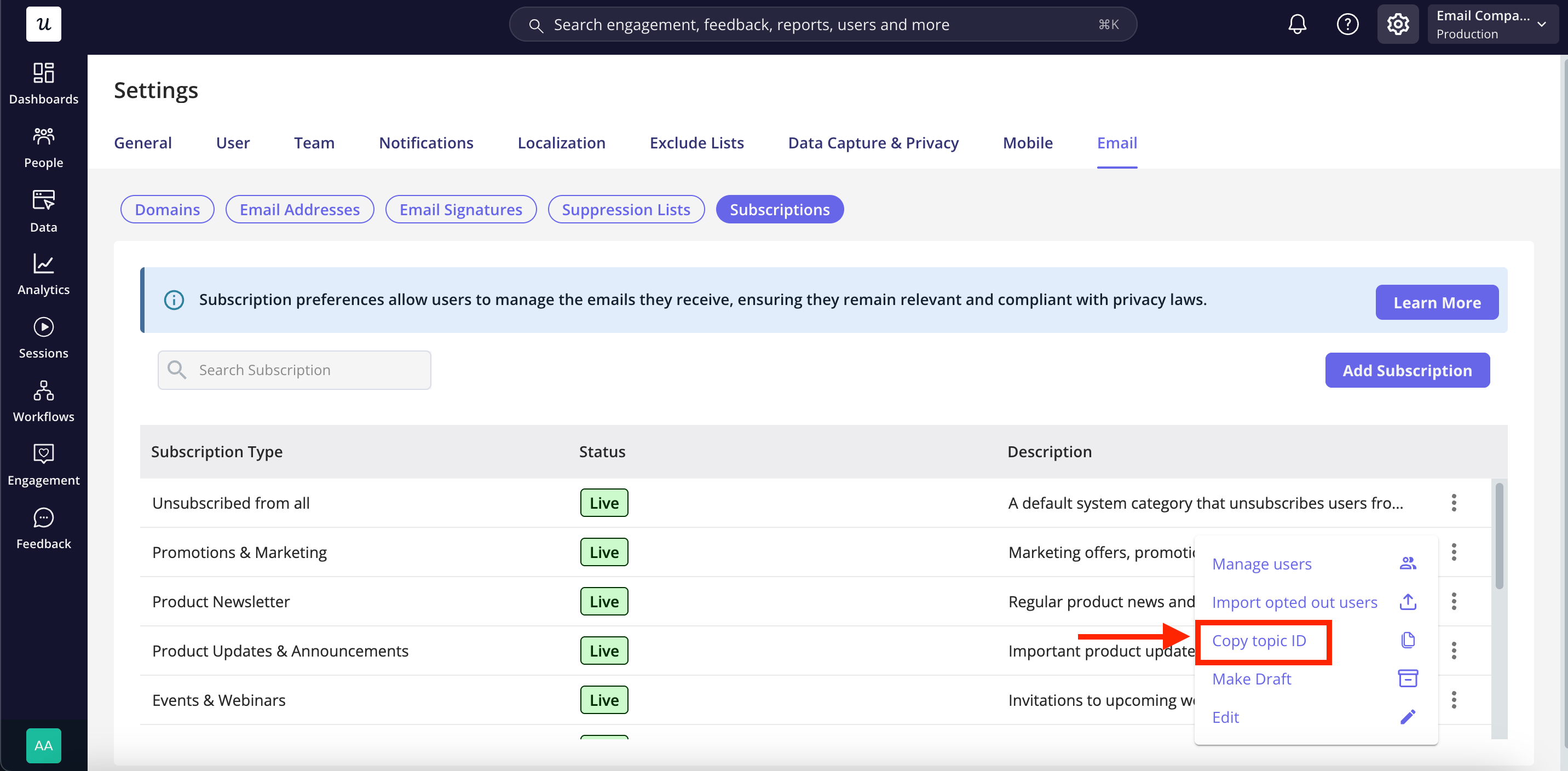
* The `topic_id` values you want to write to, from [List Subscription Topics](./list-topics)
 ## Endpoint
```http theme={null}
[POST] https://analytex.userpilot.io/v1/email_subscription_preferences
```
The endpoint URL uses the `analytex` environment. For EU data residency, use
`analytex-eu` instead. See [Environment
Settings](https://run.userpilot.io/environment) for your specific endpoint.
{" "}
## Headers
| Header | Value | Required |
| --------------- | ---------------------- | -------- |
| `Content-Type` | `application/json` | Yes |
| `Authorization` | `Token {YOUR_API_KEY}` | Yes |
| `X-API-Version` | `2020-09-22` | No |
These endpoints have no versioned behavior, so `X-API-Version` is accepted and ignored. Send it if you already send it everywhere else.
Every response carries `x-ratelimit-limit`, `x-ratelimit-remaining`, and `x-ratelimit-reset`, so you can pace a large sync off the headers rather than guessing.
## Request Body
| Field | Type | Required | Description |
| --------- | ----- | -------- | ------------------------------------------ |
| `records` | array | Yes | Up to 1,000 records. See the fields below. |
Each record takes:
| Field | Type | Required | Description |
| ----------- | ------- | -------- | ------------------------------------------------------------------------------------- |
| `email` | string | Yes | The address to change. Matched without regard to case or surrounding spaces. |
| `topic_ids` | array | Yes | The subscription types this record applies to. |
| `all` | boolean | Yes | `true` applies the change to every email, including emails with no subscription type. |
| `status` | string | No | `unsubscribed` or `subscribed`. Defaults to `unsubscribed`. |
Specify `topic_ids`, set `all: true`, or include both. Each record must contain at least one of these options; records with neither will be rejected.
## Example
```json theme={null}
{
"records": [
{ "email": "kevin@acme.com", "all": true, "status": "unsubscribed" },
{ "email": "sara@globex.com", "topic_ids": [3, 7], "status": "unsubscribed" },
{ "email": "p.lang@initech.com", "topic_ids": [7], "status": "subscribed" }
]
}
```
## Example cURL Command
```bash theme={null}
curl -X POST https://analytex.userpilot.io/v1/email_subscription_preferences \
-H 'Content-Type: application/json' \
-H 'Authorization: Token {YOUR_API_KEY}' \
-H 'X-API-Version: 2020-09-22' \
-d '{
"records": [
{ "email": "kevin@acme.com", "all": true, "status": "unsubscribed" },
{ "email": "sara@globex.com", "topic_ids": [3, 7], "status": "unsubscribed" }
]
}'
```
## Response
```json theme={null}
{
"received": 2,
"unsubscribed": 2,
"resubscribed": 0,
"rejected": []
}
```
| Field | Description |
| -------------- | ---------------------------------------------------------------------------------------- |
| `received` | How many records were accepted for processing. |
| `unsubscribed` | How many opt-outs were genuinely new. |
| `resubscribed` | How many opt-outs were lifted. |
| `rejected` | Addresses left untouched, each with a reason. See [Rejected records](#rejected-records). |
`unsubscribed` counts changes, not records. Sending five addresses where three were already unsubscribed comes back as `2`, so you can tell what actually changed and avoid double counting in your own system.
## Rules worth knowing
**Unsubscribing only adds.** A record with `status: unsubscribed` is merged with whatever that address had already opted out of. It never clears an existing opt-out, so replaying a request or resending a full list is safe.
**`all` is a master switch.** Re-subscribing someone to one subscription type doesn't lift a global opt-out. To undo it, send `all: true` with `status: subscribed`, which lifts the global block and leaves any subscription type opt-outs that address has in place.
**Addresses don't have to be Userpilot users.** An address nobody has identified yet is accepted, and the opt-out applies automatically if that person ever signs up.
**Duplicates collapse.** The same address more than once in a request is merged rather than treated as an error.
**One address, one person.** If the same address exists on several Userpilot accounts, the change covers all of them.
Put all of a person's subscription types in **one** record, like `{"email": "sara@globex.com", "topic_ids": [3, 7]}`, rather than a record per subscription type spread across requests you send at the same time. Everything Userpilot holds for an address lives in a single row, so two requests writing that same address concurrently can overwrite each other. Different addresses in parallel are fine.
**Changes apply from the next send.** An email triggered by an event, or sent from a workflow, checks preferences as it goes out, so a change applies right away. A send to a segment works out its recipients when the send starts, so an opt-out that arrives mid-send applies to the next one.
### Rejected records
Whoever unsubscribed decides who can undo it. If someone opted out through the unsubscribe link in an email, or through the one-click button in Gmail or Yahoo, this endpoint cannot re-subscribe them. Those addresses come back in `rejected` with the rest of the request applied as normal:
```json theme={null}
{
"received": 3,
"unsubscribed": 1,
"resubscribed": 1,
"rejected": [
{
"email": "kevin@acme.com",
"reason": "this address opted out through the preference centre; only the recipient can re-subscribe it"
}
]
}
```
The way back for that person is the preference link in any email you send them.
## Validation
Validation is all or nothing. If any record is malformed, the whole request is rejected with a `400` and nothing is written, so you never have to work out how much of a batch took effect:
```json theme={null}
{
"errors": [
{
"error": "Bad Request",
"error_code": "400",
"message": "Invalid request payload provided.",
"details": "records[1]: unknown topic_id 99"
}
]
}
```
`details` names the offending index. Rejected records are the one exception to all-or-nothing: refusing an entire import over one address that someone opted out of themselves would leave you with no way to proceed.
## Common Issues
| Error | Cause | Solution |
| ------------------------------------------------ | -------------------------------------------------- | --------------------------------------------------------- |
| 401 Unauthorized | Invalid or suspended API key | Verify your key in Environment settings |
| 400 `Request must include a records list` | `records` missing, not an array, or empty | Wrap your records in a non-empty `records` array |
| 400 `A request may contain at most 1000 records` | Batch too large | Split the batch and send it in pages |
| 400 `unknown topic_id 99` | The ID doesn't exist on this account | Look it up with [List Subscription Topics](./list-topics) |
| 400 `email must be a valid email address` | A malformed address | Fix the record at the index named in `details` |
| 429 Too Many Requests | Over 600 requests per minute per application token | Back off and retry with a growing delay |
## Related
* [List Subscription Topics](./list-topics) - Find the IDs to write to
* [Manage unsubscribes](/in-app-engagement/emails/manage-unsubscribes) - Import and manage the same lists from the dashboard
* [Webhooks](/integrations/webhooks) - Receive an event when someone unsubscribes in Userpilot
## Endpoint
```http theme={null}
[POST] https://analytex.userpilot.io/v1/email_subscription_preferences
```
The endpoint URL uses the `analytex` environment. For EU data residency, use
`analytex-eu` instead. See [Environment
Settings](https://run.userpilot.io/environment) for your specific endpoint.
{" "}
## Headers
| Header | Value | Required |
| --------------- | ---------------------- | -------- |
| `Content-Type` | `application/json` | Yes |
| `Authorization` | `Token {YOUR_API_KEY}` | Yes |
| `X-API-Version` | `2020-09-22` | No |
These endpoints have no versioned behavior, so `X-API-Version` is accepted and ignored. Send it if you already send it everywhere else.
Every response carries `x-ratelimit-limit`, `x-ratelimit-remaining`, and `x-ratelimit-reset`, so you can pace a large sync off the headers rather than guessing.
## Request Body
| Field | Type | Required | Description |
| --------- | ----- | -------- | ------------------------------------------ |
| `records` | array | Yes | Up to 1,000 records. See the fields below. |
Each record takes:
| Field | Type | Required | Description |
| ----------- | ------- | -------- | ------------------------------------------------------------------------------------- |
| `email` | string | Yes | The address to change. Matched without regard to case or surrounding spaces. |
| `topic_ids` | array | Yes | The subscription types this record applies to. |
| `all` | boolean | Yes | `true` applies the change to every email, including emails with no subscription type. |
| `status` | string | No | `unsubscribed` or `subscribed`. Defaults to `unsubscribed`. |
Specify `topic_ids`, set `all: true`, or include both. Each record must contain at least one of these options; records with neither will be rejected.
## Example
```json theme={null}
{
"records": [
{ "email": "kevin@acme.com", "all": true, "status": "unsubscribed" },
{ "email": "sara@globex.com", "topic_ids": [3, 7], "status": "unsubscribed" },
{ "email": "p.lang@initech.com", "topic_ids": [7], "status": "subscribed" }
]
}
```
## Example cURL Command
```bash theme={null}
curl -X POST https://analytex.userpilot.io/v1/email_subscription_preferences \
-H 'Content-Type: application/json' \
-H 'Authorization: Token {YOUR_API_KEY}' \
-H 'X-API-Version: 2020-09-22' \
-d '{
"records": [
{ "email": "kevin@acme.com", "all": true, "status": "unsubscribed" },
{ "email": "sara@globex.com", "topic_ids": [3, 7], "status": "unsubscribed" }
]
}'
```
## Response
```json theme={null}
{
"received": 2,
"unsubscribed": 2,
"resubscribed": 0,
"rejected": []
}
```
| Field | Description |
| -------------- | ---------------------------------------------------------------------------------------- |
| `received` | How many records were accepted for processing. |
| `unsubscribed` | How many opt-outs were genuinely new. |
| `resubscribed` | How many opt-outs were lifted. |
| `rejected` | Addresses left untouched, each with a reason. See [Rejected records](#rejected-records). |
`unsubscribed` counts changes, not records. Sending five addresses where three were already unsubscribed comes back as `2`, so you can tell what actually changed and avoid double counting in your own system.
## Rules worth knowing
**Unsubscribing only adds.** A record with `status: unsubscribed` is merged with whatever that address had already opted out of. It never clears an existing opt-out, so replaying a request or resending a full list is safe.
**`all` is a master switch.** Re-subscribing someone to one subscription type doesn't lift a global opt-out. To undo it, send `all: true` with `status: subscribed`, which lifts the global block and leaves any subscription type opt-outs that address has in place.
**Addresses don't have to be Userpilot users.** An address nobody has identified yet is accepted, and the opt-out applies automatically if that person ever signs up.
**Duplicates collapse.** The same address more than once in a request is merged rather than treated as an error.
**One address, one person.** If the same address exists on several Userpilot accounts, the change covers all of them.
Put all of a person's subscription types in **one** record, like `{"email": "sara@globex.com", "topic_ids": [3, 7]}`, rather than a record per subscription type spread across requests you send at the same time. Everything Userpilot holds for an address lives in a single row, so two requests writing that same address concurrently can overwrite each other. Different addresses in parallel are fine.
**Changes apply from the next send.** An email triggered by an event, or sent from a workflow, checks preferences as it goes out, so a change applies right away. A send to a segment works out its recipients when the send starts, so an opt-out that arrives mid-send applies to the next one.
### Rejected records
Whoever unsubscribed decides who can undo it. If someone opted out through the unsubscribe link in an email, or through the one-click button in Gmail or Yahoo, this endpoint cannot re-subscribe them. Those addresses come back in `rejected` with the rest of the request applied as normal:
```json theme={null}
{
"received": 3,
"unsubscribed": 1,
"resubscribed": 1,
"rejected": [
{
"email": "kevin@acme.com",
"reason": "this address opted out through the preference centre; only the recipient can re-subscribe it"
}
]
}
```
The way back for that person is the preference link in any email you send them.
## Validation
Validation is all or nothing. If any record is malformed, the whole request is rejected with a `400` and nothing is written, so you never have to work out how much of a batch took effect:
```json theme={null}
{
"errors": [
{
"error": "Bad Request",
"error_code": "400",
"message": "Invalid request payload provided.",
"details": "records[1]: unknown topic_id 99"
}
]
}
```
`details` names the offending index. Rejected records are the one exception to all-or-nothing: refusing an entire import over one address that someone opted out of themselves would leave you with no way to proceed.
## Common Issues
| Error | Cause | Solution |
| ------------------------------------------------ | -------------------------------------------------- | --------------------------------------------------------- |
| 401 Unauthorized | Invalid or suspended API key | Verify your key in Environment settings |
| 400 `Request must include a records list` | `records` missing, not an array, or empty | Wrap your records in a non-empty `records` array |
| 400 `A request may contain at most 1000 records` | Batch too large | Split the batch and send it in pages |
| 400 `unknown topic_id 99` | The ID doesn't exist on this account | Look it up with [List Subscription Topics](./list-topics) |
| 400 `email must be a valid email address` | A malformed address | Fix the record at the index named in `details` |
| 429 Too Many Requests | Over 600 requests per minute per application token | Back off and retry with a growing delay |
## Related
* [List Subscription Topics](./list-topics) - Find the IDs to write to
* [Manage unsubscribes](/in-app-engagement/emails/manage-unsubscribes) - Import and manage the same lists from the dashboard
* [Webhooks](/integrations/webhooks) - Receive an event when someone unsubscribes in Userpilot