> ## Documentation Index
> Fetch the complete documentation index at: https://docs.userpilot.com/llms.txt
> Use this file to discover all available pages before exploring further.
# Data Retention
> Control how long Userpilot stores your analytics events and session replays. Configurable on Growth and Enterprise plans, fixed on all other plans.
Custom retention windows are available on **Growth** and **Enterprise** plans. All other plans use fixed retention values described below.
## Overview
Data retention controls how long Userpilot stores the analytics events and session replays captured for your application. Each Userpilot organization has two independent retention windows:
* **Tracked data and interactions** — how long Userpilot keeps analytics events (page views, tracked events, autocaptured raw events, content interactions) available for reporting.
* **Recorded sessions** — how long Userpilot keeps session replay recordings available for playback.
Aligning these windows with your needs helps you balance long-term trend analysis against compliance, privacy, and storage cost requirements.
## Use Cases
* **Compliance and governance** – Configure shorter retention to align with GDPR, CCPA, or internal data-handling policies.
* **Long-term trend analysis** – On Growth and Enterprise plans, extend retention to compare year-over-year product usage.
* **Cost-aware operations** – Keep only the data you actively use for reporting, reducing the surface area of stored personal data.
* **Audit and incident review** – Define a retention window long enough to reconstruct user journeys when investigating bugs or incidents.
## Retention by plan
| Plan | Tracked data and interactions | Recorded sessions | Configurable? |
| ---------- | ------------------------------------------- | --------------------- | ------------------------------------- |
| Starter | **1 year** reportable (3 years stored) | **30 days** | No (fixed) |
| Growth | **3 years** storage and reporting (default) | **30 days** (default) | Yes — contact your CSM representative |
| Enterprise | **3 years** storage and reporting (default) | **30 days** (default) | Yes — contact your CSM representative |
On Growth and Enterprise, both windows can be extended on request. Your current values are always visible in **Settings → Subscription → Plan details**.
## What's covered
Retention windows apply to:
* Tracked events (custom and built-in)
* Autocaptured raw events
* Content interactions (flow steps, checklist items, NPS / surveys responses, etc.)
* Session replay recordings
## Where retention shows up in the product
Retention windows are enforced consistently across the product. You'll see their effects in the following places.
### Settings → Subscription → Plan details
The **Plan details** card now shows a **Data retention** section with two rows: **Tracked data and interactions** and **Recorded sessions**. The values reflect either your fixed plan limits or your custom configuration.
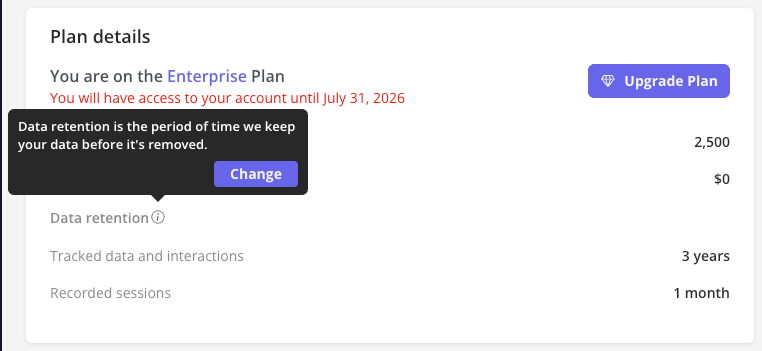
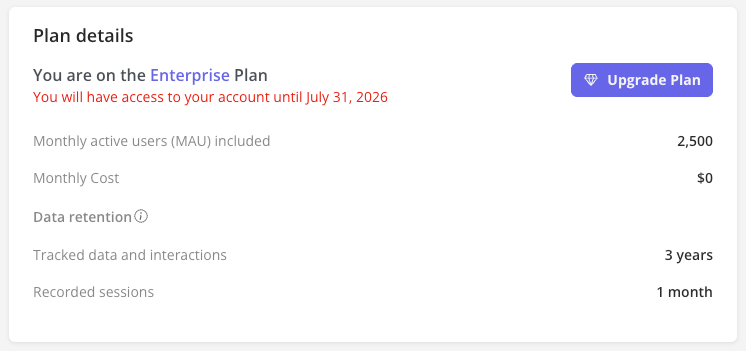 Hover the info icon next to **Data retention** to see a tooltip with a **Change** button.
 ### Reports and Dashboards date pickers
Date pickers in Reports and Dashboards are bounded by your analytics retention window. The earliest selectable date is the start of your retention window, and period presets that fall outside the window are hidden.
When a previously selected start date falls outside your current retention window, Userpilot automatically adjusts it to the boundary and surfaces a tooltip that reads: **The date has been adjusted to stay within your data retention window.**
### Sessions date picker and filters
The Sessions date picker, playlists, and saved filters are bounded by your **session replay** retention window — independent from analytics retention.
## Changing your retention period
Changing retention is available on **Growth** and **Enterprise** plans only.
1. Open **Settings → Subscription → Plan details**.
2. In the **Data retention** section, hover the info icon and click **Change**.
3. A scheduling page opens so you can book a call with your Userpilot support representative to discuss the new retention values.
If you're on Starter, or Trial, upgrade to Growth or Enterprise to unlock configurable retention.
## What happens when data expires
* The cleanup job runs once per month, on the **first Saturday of the month at 03:30 UTC**. It is irreversible — expired data cannot be recovered.
* Analytics events older than your configured window are deleted from storage in the partitions that match the expiry boundary.
* Session replay recordings are tagged at capture time with their organization's retention window, and expire automatically through storage lifecycle policies.
## FAQs
No. Once the monthly cleanup runs, expired analytics events and session replays are permanently removed and cannot be restored. If you need a longer retention window, change it before your data expires (Growth and Enterprise only).
Yes. Only data still within your retention window is available to export. Data that has expired through the monthly cleanup is no longer available through the Export API.
No. Monthly Active Users (MAU) counts and billing are independent from retention. Changing your retention window does not change how MAU is calculated.
Date pickers across Reports, Dashboards, and Sessions are bounded by your retention window. The earliest selectable date is the start of that window. To go further back, you'd need a longer retention window (Growth and Enterprise only).
Unless your organization has a custom agreement, the defaults are **3 years** for **tracked data and interactions** (how long events are stored and available for reporting) and **30 days** for **recorded sessions** (session replay storage). Your exact values are always shown at **Settings → Subscription → Plan details** in the **Data retention** section.
Changes apply immediately for new data. Existing data that falls outside the new (shorter) retention window is removed at the next monthly cleanup. Existing data that fits within the new (longer) retention window stays available for reporting and replay.
[For any questions or concerns please reach out to **support@userpilot.com**](mailto:support@userpilot.com)
### Reports and Dashboards date pickers
Date pickers in Reports and Dashboards are bounded by your analytics retention window. The earliest selectable date is the start of your retention window, and period presets that fall outside the window are hidden.
When a previously selected start date falls outside your current retention window, Userpilot automatically adjusts it to the boundary and surfaces a tooltip that reads: **The date has been adjusted to stay within your data retention window.**
### Sessions date picker and filters
The Sessions date picker, playlists, and saved filters are bounded by your **session replay** retention window — independent from analytics retention.
## Changing your retention period
Changing retention is available on **Growth** and **Enterprise** plans only.
1. Open **Settings → Subscription → Plan details**.
2. In the **Data retention** section, hover the info icon and click **Change**.
3. A scheduling page opens so you can book a call with your Userpilot support representative to discuss the new retention values.
If you're on Starter, or Trial, upgrade to Growth or Enterprise to unlock configurable retention.
## What happens when data expires
* The cleanup job runs once per month, on the **first Saturday of the month at 03:30 UTC**. It is irreversible — expired data cannot be recovered.
* Analytics events older than your configured window are deleted from storage in the partitions that match the expiry boundary.
* Session replay recordings are tagged at capture time with their organization's retention window, and expire automatically through storage lifecycle policies.
## FAQs
No. Once the monthly cleanup runs, expired analytics events and session replays are permanently removed and cannot be restored. If you need a longer retention window, change it before your data expires (Growth and Enterprise only).
Yes. Only data still within your retention window is available to export. Data that has expired through the monthly cleanup is no longer available through the Export API.
No. Monthly Active Users (MAU) counts and billing are independent from retention. Changing your retention window does not change how MAU is calculated.
Date pickers across Reports, Dashboards, and Sessions are bounded by your retention window. The earliest selectable date is the start of that window. To go further back, you'd need a longer retention window (Growth and Enterprise only).
Unless your organization has a custom agreement, the defaults are **3 years** for **tracked data and interactions** (how long events are stored and available for reporting) and **30 days** for **recorded sessions** (session replay storage). Your exact values are always shown at **Settings → Subscription → Plan details** in the **Data retention** section.
Changes apply immediately for new data. Existing data that falls outside the new (shorter) retention window is removed at the next monthly cleanup. Existing data that fits within the new (longer) retention window stays available for reporting and replay.
[For any questions or concerns please reach out to **support@userpilot.com**](mailto:support@userpilot.com)