> ## Documentation Index
> Fetch the complete documentation index at: https://docs.userpilot.com/llms.txt
> Use this file to discover all available pages before exploring further.
# Raw Events
> Userpilot can automatically capture events using the raw events auto-capturing feature, which captures events like Clicks, Text Inputs, and Form Submissions.
### Overview
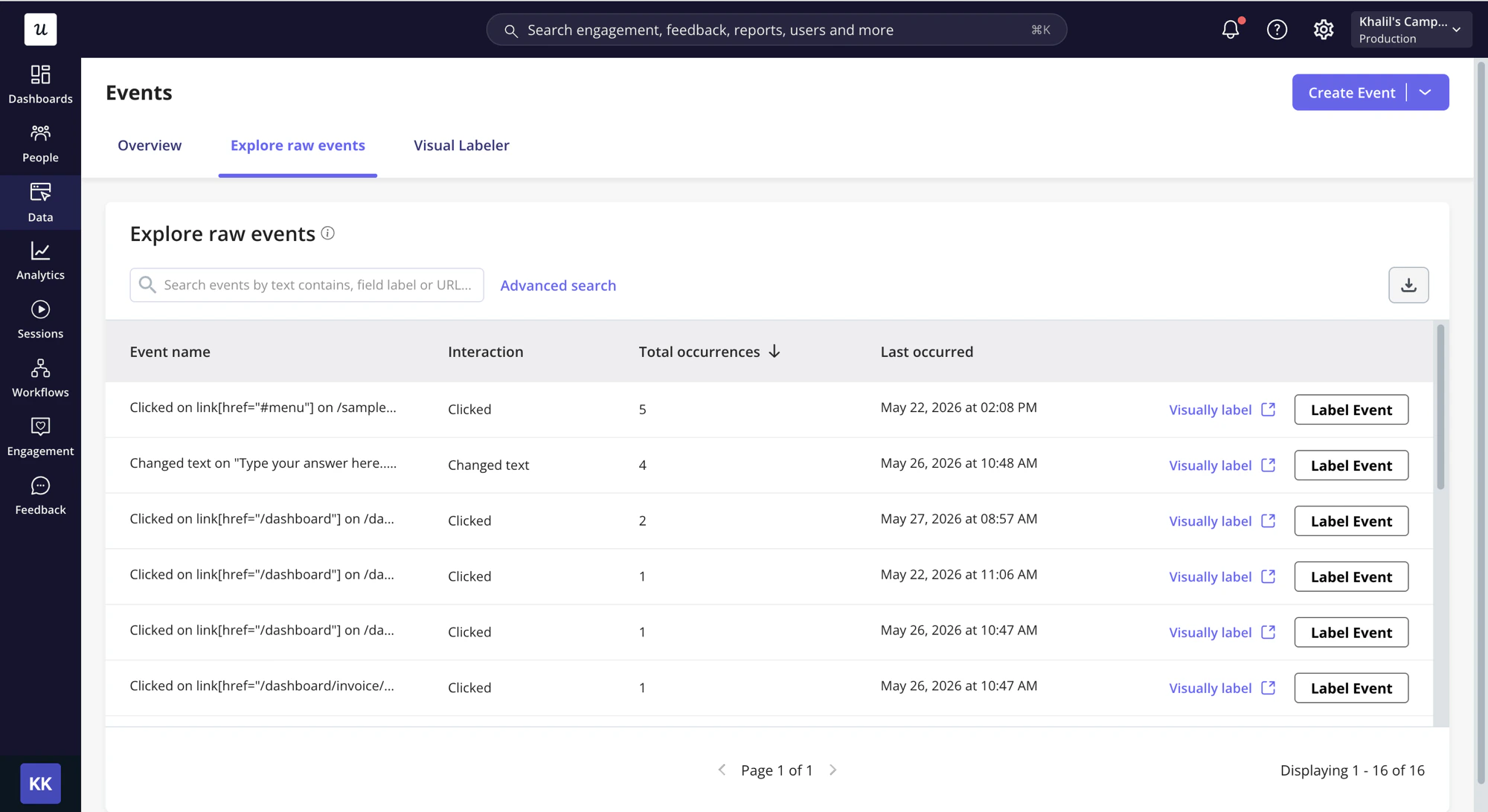
Userpilot's raw events auto-capture automatically captures Clicks, Text Inputs, and Form Submissions, so you don't need to visually label events with the Chrome extension; you can label them directly from the auto-capture events page. It starts collecting data the moment auto-capture is enabled, reflected in Userpilot in real time.
Auto-capture powers advanced segmentation, content triggering, and analytical reporting, letting nontechnical teams (product and UI/UX) and even stakeholders make data-driven decisions.
### Use Cases
* Surface your most interacted-with features by occurrence count, then easily flag and label the important ones
* Get an intuitive view of feature usage and where users spend their time on your product
* Once labeled, use the events to trigger content and track user activity for segmentation
### Raw Events Auto-Capture Enabling/Excluding
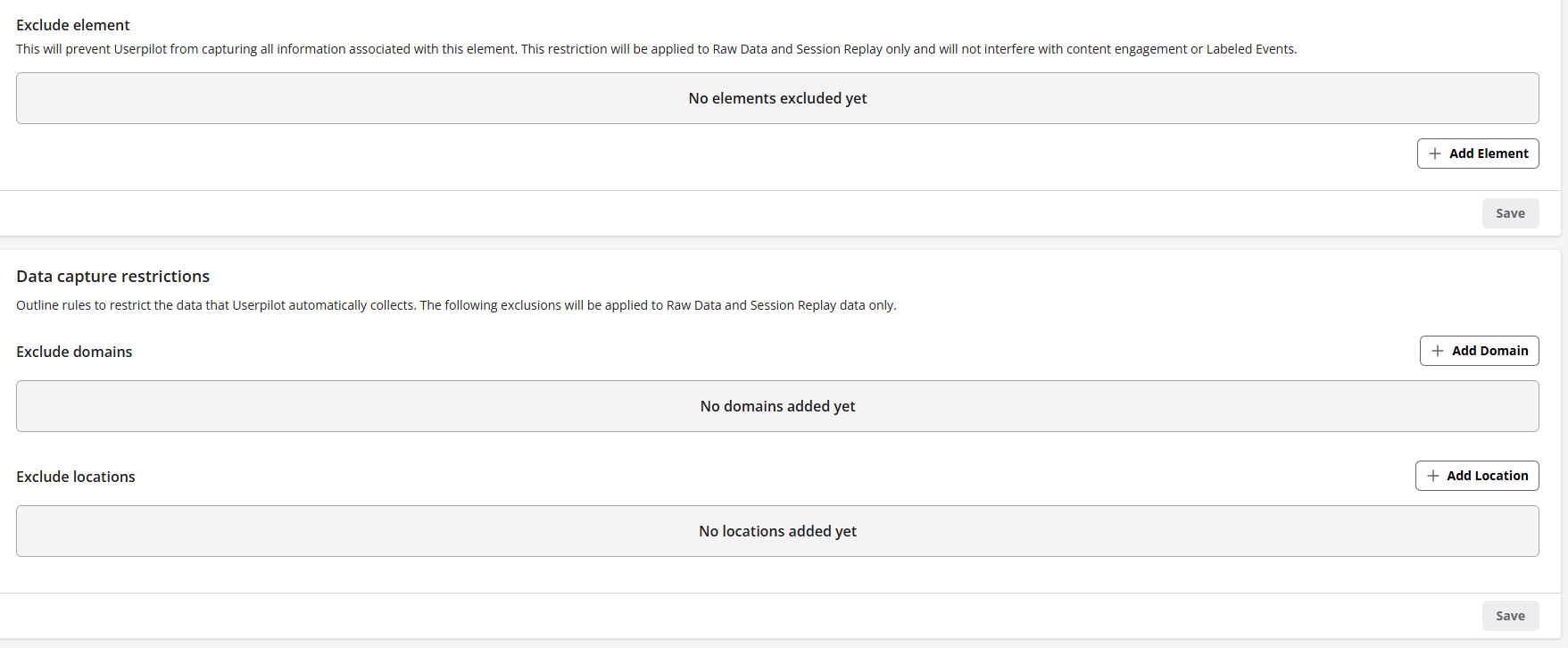
Under [Configure - Settings](https://run.userpilot.io/settings/data-capture-privacy), raw events auto-capturing can be enabled/disabled. This has to be enabled for Userpilot to collect users' interactions (clicks, text input, form submissions).
Excluding certain elements, domains, and locations can also be added under the exclude fields not to be auto-captured by Userpilot.
### Types of interactions captured
* **Click**: Any clicks on a button, link, or element (meaningful clicks/actions). In other words, clicking buttons with underlying mutations, links, or elements, each with a descriptive title.
* **Text Input**: Typing a character or more into a text field, with each interaction tied to the field’s placeholder or input name. The description may include the placeholder text or the input name, depending on the field.
* **Form Submission**: The user submits a form, typically via a button or submit input which triggers the underlying action or mutation to process the data entered in the form.
### Labeling Raw Events
This is only available for Growth & Enterprise plans
Turn a Raw Event into a [**Labeled Event**](../autocapture/visual-labeler) by clicking "Label Event" or "Visually label" next to the captured Raw Event. Some settings are pre-filled based on how the event was captured (Name, Domain, URL path, and CSS selectors), and you can customize them as needed.
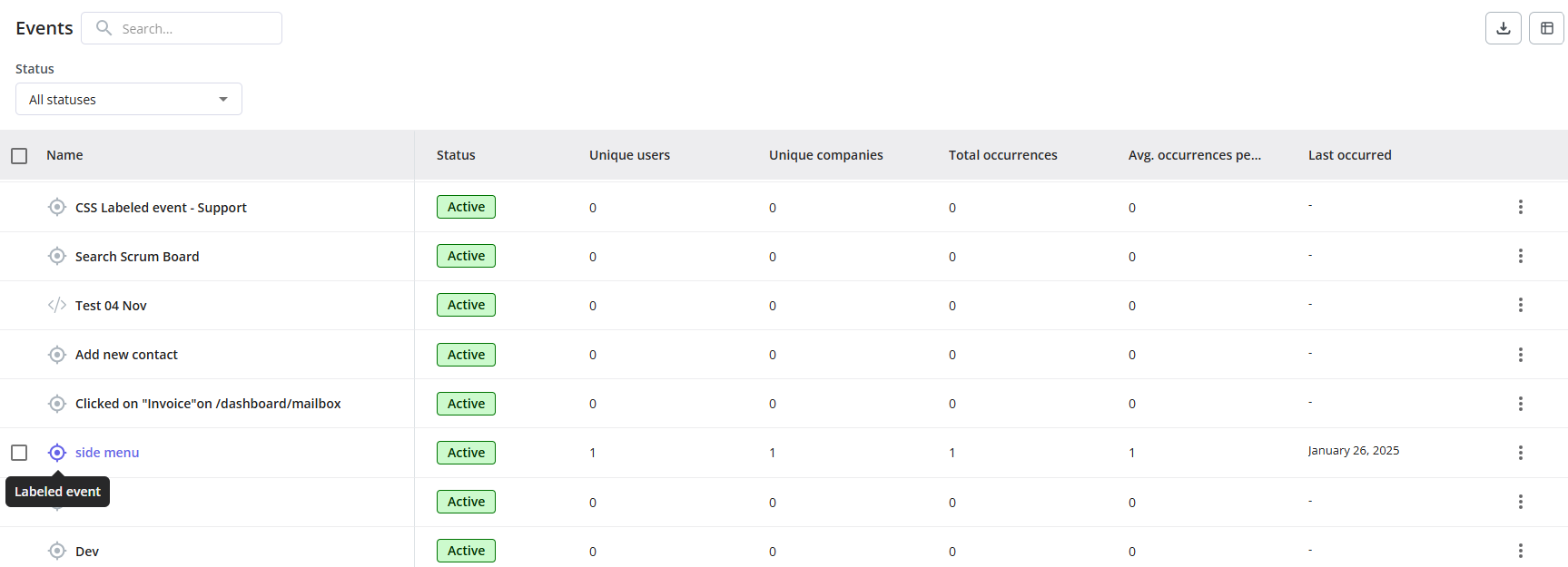
After the event has been labeled, it will appear under [Overview](https://run.userpilot.io/events/overview) with the rest of the events (tracked events, custom events). It can be used for segmentation, content triggering, and creating analytical reports.
Once you label a Raw Event, its **historical data** (collected before labeling) becomes available in **Event Overview** and **Analytics** (report creation). **Segments** and **Content Triggering**, however, only consider data collected after the event was labeled.
Changing the configuration/targeting settings of a Labeled Event affects the historical data collected.
### Supported CSS Selectors for Autocapture Raw Events
Examples: `div`, `span`, `button`, `a`, `form`, `font`, `path`, `svg`, `input`, etc...
Examples:
| `a.MuiButtonBase-root.MuiListItem-button.MuiListItem-gutters` | |
| ------------------------------------------------------------- | - |
| `#main-container-id, #table-container-id` | |
| `div#root` | |
Example: `div.MuiPaper-root.MuiPaper-rounded:nth-child(3)`
* **Specific Value**: `[attr="V"]` - Select elements that have attribute `attr` with a specific value of `V`. Example: `div[role="button"][aria-haspopup="true"][aria-disabled="false"]`
* **The Attribute Value Starts With**: `[attr^="V"]` - Select elements that have attribute `attr` with a value starting with `V`. Example: `div[tabindex="0"][role="button"][aria-labelledby^="period"]`
* **The Attribute Value Ends With:** `[attr$="V"]` - Select elements that have attribute `attr` with a value ending in `V`
* **The Attribute Value Contains:** `[attr*="V"]` - Select elements that have attribute `attr` with a value containing `V`
* **The Attribute Starts With a Value Followed by Hyphen:** `[attr|="V"]` - Select elements that have attribute `attr` with an exact value of `V` or start with `V` followed by a hyphen (`V-`). Example: `[role~="dialog"][aria-describedby|="alert-dialog"]`
* **The Attribute Value is a Space-Separated List of Words:** `[attr~="V"]` - Select elements that have attribute `attr` for which the value is a space-separated list of words, one of which is the whole word `V`. Example: `[role~="dialog"][aria-describedby|="alert-dialog"]`
* **Child Combinator** examples:
| `#main-container-id > div.MuiPaper-root.jss1058.jss1046.MuiPaper-elevation0 > div.MuiTabs-root > div > div > a:nth-child(2)[href="/flows/ordering"]` | |
| -------------------------------------------------------------------------------------------------------------------------------------------------------------------------------------------------------------------------- | - |
| `body > div.MuiDrawer-root.jss84.MuiDrawer-modal > div.MuiPaper-root.MuiDrawer-paper.jss85.MuiDrawer-paperAnchorLeft.MuiPaper-elevation16 > div > ul > span:nth-child(1) > a[tabindex="-1"][role="button"][href="/users"]` | |
* **Descendant Combinator** examples:
| `div#root button p` | | |
| ------------------------------------- | - | :- |
| `#main-container-id button > span p` | | |
| `id=["main-container-id"] button div` | | |
| `div#menu-segment_id li > div` | | |
### FAQs
Raw Events start to collect data once Userpilot is installed on your web app and auto-capturing is enabled, meaning that you would start collecting data on all your users' interactions giving measures on your user behavior and what to track to be used in analytics, content triggering, targeting, and segmentation.
Yes, after labeling the raw events, you can send them through our HubSpot, Salesforce, and Webhook integrations. We do have plans to add labeled events to our native integrations as well.
[For any questions or concerns please reach out to **support@userpilot.com**](mailto:support@userpilot.com)
 Excluding certain elements, domains, and locations can also be added under the exclude fields not to be auto-captured by Userpilot.
 ### Types of interactions captured
* **Click**: Any clicks on a button, link, or element (meaningful clicks/actions). In other words, clicking buttons with underlying mutations, links, or elements, each with a descriptive title.
* **Text Input**: Typing a character or more into a text field, with each interaction tied to the field’s placeholder or input name. The description may include the placeholder text or the input name, depending on the field.
* **Form Submission**: The user submits a form, typically via a button or submit input which triggers the underlying action or mutation to process the data entered in the form.
### Labeling Raw Events
### Types of interactions captured
* **Click**: Any clicks on a button, link, or element (meaningful clicks/actions). In other words, clicking buttons with underlying mutations, links, or elements, each with a descriptive title.
* **Text Input**: Typing a character or more into a text field, with each interaction tied to the field’s placeholder or input name. The description may include the placeholder text or the input name, depending on the field.
* **Form Submission**: The user submits a form, typically via a button or submit input which triggers the underlying action or mutation to process the data entered in the form.
### Labeling Raw Events
 After the event has been labeled, it will appear under [Overview](https://run.userpilot.io/events/overview) with the rest of the events (tracked events, custom events). It can be used for segmentation, content triggering, and creating analytical reports.