> ## Documentation Index
> Fetch the complete documentation index at: https://docs.userpilot.com/llms.txt
> Use this file to discover all available pages before exploring further.
# Anonymous Users
> To display Userpilot content to users who aren't logged in or are browsing your public website anonymously, you can utilize the function.
### Overview
To trigger Userpilot content for users who are not authenticated or are browsing your public website anonymously, implement the `userpilot.anonymous()` function. This method allows Userpilot to automatically generate a unique user ID, enabling the display of targeted content without requiring any user-specific data.
### **Implementation Steps**
1. **Include the Userpilot Script:**
Insert the following script into the `` section of your webpage:
```javascript theme={null}
```
Replace `"appToken"` with your actual [Userpilot application token.](https://run.userpilot.io/environment)
2. **Initialize Userpilot Anonymously:**
After including the script, call the `userpilot.anonymous()` function:
```javascript theme={null}
```
This function generates a unique user ID, allowing the user to view the triggered content without the need to pass any personal data.
Keep in mind that users accessing pages with the Userpilot script installed are counted as monthly active users (MAU). Userpilot tracks the number of unique users who have logged into the system over the past 30 days. Therefore, to be counted towards your MAU, a user must be identified using either `userpilot.identify()` or `userpilot.anonymous()`, ensuring they are recognized as unique users within the specified period.
### **Restricting Content to Anonymous Users**
If you wish to display specific Flows, Checklists, Spotlights, or Resource Center modules exclusively to anonymous users, adjust the Audience condition as follows:
Set the condition to 'User Data' => 'user id' => doesn't exist.
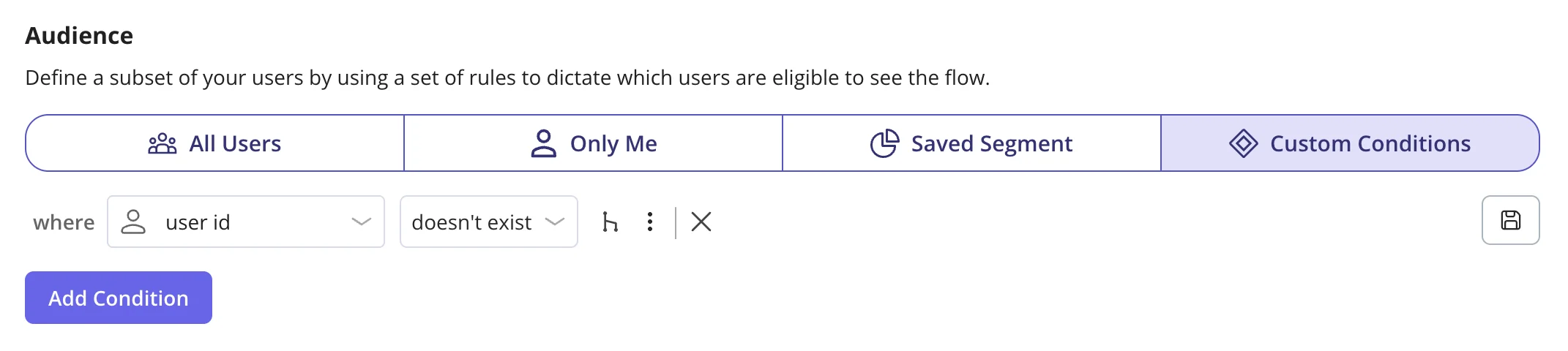 Any Userpilot content with the Audience setting set to "All users" will appear for the anonymous user.
This configuration ensures that the designated content is shown only to users without an assigned user ID, effectively targeting anonymous visitors.
By implementing the `userpilot.anonymous()` function, you can effectively engage with anonymous users, providing them with tailored content and enhancing their overall experience on your platform.
[**For any questions or concerns please reach out to support@userpilot.com**](mailto:support@userpilot.com)
Any Userpilot content with the Audience setting set to "All users" will appear for the anonymous user.
This configuration ensures that the designated content is shown only to users without an assigned user ID, effectively targeting anonymous visitors.
By implementing the `userpilot.anonymous()` function, you can effectively engage with anonymous users, providing them with tailored content and enhancing their overall experience on your platform.
[**For any questions or concerns please reach out to support@userpilot.com**](mailto:support@userpilot.com)