> ## Documentation Index
> Fetch the complete documentation index at: https://docs.userpilot.com/llms.txt
> Use this file to discover all available pages before exploring further.
# Suppression list
> The Suppression List helps you maintain email deliverability, protect your sender reputation, and ensure compliance with regulations such as CAN-SPAM and GDPR.
## Overview
The Suppression List helps you maintain email deliverability, protect your sender reputation, and ensure compliance with regulations such as **CAN-SPAM** and **GDPR**. It automatically tracks and manages email addresses that should no longer receive emails from you for some reason.
## Get started
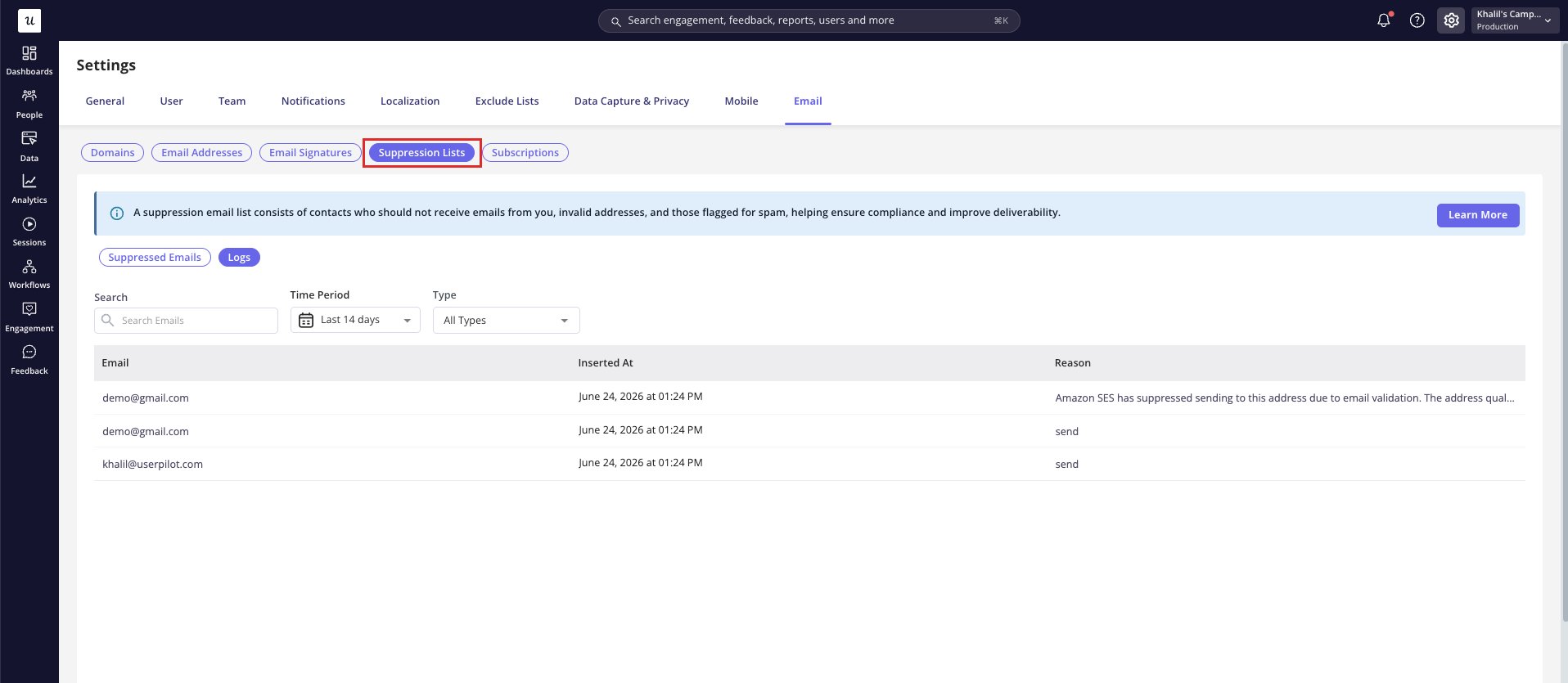
Click on [Configure > Settings > Email >](https://run.userpilot.io/settings/email-settings/email-suppression-lists) where you'll find your **Suppression** list.
Then you will see key details for each suppressed email:
* **Email:** the address that was suppressed.
* **Date:** when the address was marked for suppression.
* **Suppression Reason:** why it was added to the list.
Userpilot automatically maintains a **suppression** list and prevents sending emails to addresses flagged for various reasons.
* If you try sending an email to an address on the suppression list, Userpilot will automatically block it to ensure compliance.
* You can’t manually add or edit email addresses. However, you can unsuppress addresses if needed.
 ## Suppression reasons
Userpilot’s suppression list covers multiple reasons an email might be blocked from future sends:
**1. User Opt-Out**
Users who clicked “unsubscribe from all emails” will automatically be added to the suppression list to respect their marketing preferences.
**2. Hard Bounce (Invalid Email Addresses)**
These are addresses that can’t be delivered due to permanent errors:
* **Incorrect Email Addresses:** Typographical or formatting errors.
* **Non-Existent Domains:** Domains that don’t exist or are unreachable.
* **Repeated Mailbox Full:** Addresses that consistently bounce due to a full inbox.
**3. Spam Complaints**
Users who marked your emails as spam will be suppressed automatically, protecting your sender reputation and avoiding potential blacklisting.
**4. Temporary Soft Bounce**
Addresses that failed to deliver multiple times because of server issues will be added to the suppression list to reduce repeated failures.
**5. Role-Based Emails**
Group or shared addresses (for example, [**support@company.com**](mailto:support@company.com)) that are flagged for issues may also fall under suppression, ensuring better targeting and deliverability.
## Why this matters
Maintaining a suppression list is essential for:
* Compliance with regulations (e.g., CAN-SPAM, GDPR).
* Protecting your sender reputation.
* Improving email deliverability.
* Respecting your users’ preferences.
Userpilot’s suppression list management is designed to be automatic and transparent, so you can focus on creating meaningful user journeys without worrying about deliverability risks.
**Bounce rate and email sending pauses:** beyond suppressing individual addresses, Userpilot monitors your account's overall bounce rate to protect your sender reputation. If your bounce rate climbs too high, **email sending is automatically paused** for your account until the issue is addressed.
* Keep your hard bounce rate low (aim for **under \~0.5%**). You can inspect which recipients are failing, and why, on the email **Logs** page by filtering **Type > Hard Bounce**.
* To get sending unpaused, follow Userpilot's email **warm-up plan**: start with small batches to engaged users (recent **Last Seen**, moderate session counts), watch your bounce rate, then gradually increase volume.
* Repeated pauses escalate. A recurring pattern can lead to a longer pause (up to **3 months**) or a requirement to integrate an email-validation service with your Userpilot user properties.
[For any questions or concerns please reach out to **support@userpilot.com**](mailto:support@userpilot.com)
## Suppression reasons
Userpilot’s suppression list covers multiple reasons an email might be blocked from future sends:
**1. User Opt-Out**
Users who clicked “unsubscribe from all emails” will automatically be added to the suppression list to respect their marketing preferences.
**2. Hard Bounce (Invalid Email Addresses)**
These are addresses that can’t be delivered due to permanent errors:
* **Incorrect Email Addresses:** Typographical or formatting errors.
* **Non-Existent Domains:** Domains that don’t exist or are unreachable.
* **Repeated Mailbox Full:** Addresses that consistently bounce due to a full inbox.
**3. Spam Complaints**
Users who marked your emails as spam will be suppressed automatically, protecting your sender reputation and avoiding potential blacklisting.
**4. Temporary Soft Bounce**
Addresses that failed to deliver multiple times because of server issues will be added to the suppression list to reduce repeated failures.
**5. Role-Based Emails**
Group or shared addresses (for example, [**support@company.com**](mailto:support@company.com)) that are flagged for issues may also fall under suppression, ensuring better targeting and deliverability.
## Why this matters
Maintaining a suppression list is essential for:
* Compliance with regulations (e.g., CAN-SPAM, GDPR).
* Protecting your sender reputation.
* Improving email deliverability.
* Respecting your users’ preferences.
Userpilot’s suppression list management is designed to be automatic and transparent, so you can focus on creating meaningful user journeys without worrying about deliverability risks.
**Bounce rate and email sending pauses:** beyond suppressing individual addresses, Userpilot monitors your account's overall bounce rate to protect your sender reputation. If your bounce rate climbs too high, **email sending is automatically paused** for your account until the issue is addressed.
* Keep your hard bounce rate low (aim for **under \~0.5%**). You can inspect which recipients are failing, and why, on the email **Logs** page by filtering **Type > Hard Bounce**.
* To get sending unpaused, follow Userpilot's email **warm-up plan**: start with small batches to engaged users (recent **Last Seen**, moderate session counts), watch your bounce rate, then gradually increase volume.
* Repeated pauses escalate. A recurring pattern can lead to a longer pause (up to **3 months**) or a requirement to integrate an email-validation service with your Userpilot user properties.
[For any questions or concerns please reach out to **support@userpilot.com**](mailto:support@userpilot.com)