> ## Documentation Index
> Fetch the complete documentation index at: https://docs.userpilot.com/llms.txt
> Use this file to discover all available pages before exploring further.
# Get started with mobile content
> Drive onboarding, adoption, and retention with in-app experiences built natively for mobile.
## Overview
Userpilot's **Mobile Content** feature lets you deliver in-app experiences natively on your mobile applications. With our Mobile SDK installed, you can create and manage **Carousels**, **Slideouts**, and **Push Notifications** to improve onboarding, drive adoption, and keep users engaged.
This functionality ensures your product communication remains consistent and impactful across both web and mobile, helping you create a seamless, engaging experience for your users wherever they are.
**Mobile support** is an **add-on feature** that requires an **annual purchase** for **Enterprise** and **Growth** plans. **Starter** users will need to **upgrade** their plan to access this feature. If your **company** has a **mobile application** and wants to use Userpilot **across platforms**, feel free to reach out to our **sales team** at [**sales@userpilot.com**](mailto:sales@userpilot.com) to have it **enabled** for you.
## Use Cases
1. **User onboarding**: walk new users through key features with a multi-step Carousel.
2. **Product announcements**: share important updates or releases via Slideouts or Push Notifications.
3. **Retention campaigns**: re-engage inactive users with timely Push Notifications.
4. **Behavior-based messaging**: trigger contextual content as users navigate your app.
5. **Cross-device tracking**: measure engagement as users switch between your web and mobile experiences.
## Prerequisite
Before you can create and display mobile content, you **must** install the Userpilot SDK in your mobile app. This integration is required to:
* Enable in-app Carousels, Slideouts, and Push Notifications
* Track user behavior and attributes on mobile through events and mobile screens.
* Manage content targeting and triggering
Installation guides are available for both iOS and Android platforms. Make sure your development team follows the installation steps to complete the integration.
## How to create mobile content in Userpilot
**Navigate to Engagement > Mobile** from the sidebar, and then click **Create Content.**
.png?fit=max&auto=format&n=0hCXw5eVRU6iqpYB&q=85&s=c49205f039dc8d4e835f1a1ffb56180f)
.png?fit=max&auto=format&n=6mq0DeMvNIpVRWN5&q=85&s=d4f5ef33d44c12cf585d41bc5a99a7dd) **Choose** the mobile content type that best fits your use case, **Carousel**, **Slideout**, or **Push Notification**.
* **Carousel**: multi-step onboarding or guided tours.
* **Slideout**: single-panel announcements or contextual tips.
* **Push Notification**: message sent outside the app to re-engage users.
You can then start from **scratch** or from a **template**.
**Choose** the mobile content type that best fits your use case, **Carousel**, **Slideout**, or **Push Notification**.
* **Carousel**: multi-step onboarding or guided tours.
* **Slideout**: single-panel announcements or contextual tips.
* **Push Notification**: message sent outside the app to re-engage users.
You can then start from **scratch** or from a **template**.
.png?fit=max&auto=format&n=0BXmctFYfQD3s2Lh&q=85&s=65c5dd0305b920efac34721fe8d46f90) You'll find mobile templates for a variety of use cases, like onboarding new users, announcing features, promoting offers, sharing webinar details, collecting feedback, supporting users, or encouraging upgrades.
After that, you’ll land on the **Design tab**, where you can easily start **building** and **customizing** your mobile content.
You'll find mobile templates for a variety of use cases, like onboarding new users, announcing features, promoting offers, sharing webinar details, collecting feedback, supporting users, or encouraging upgrades.
After that, you’ll land on the **Design tab**, where you can easily start **building** and **customizing** your mobile content.
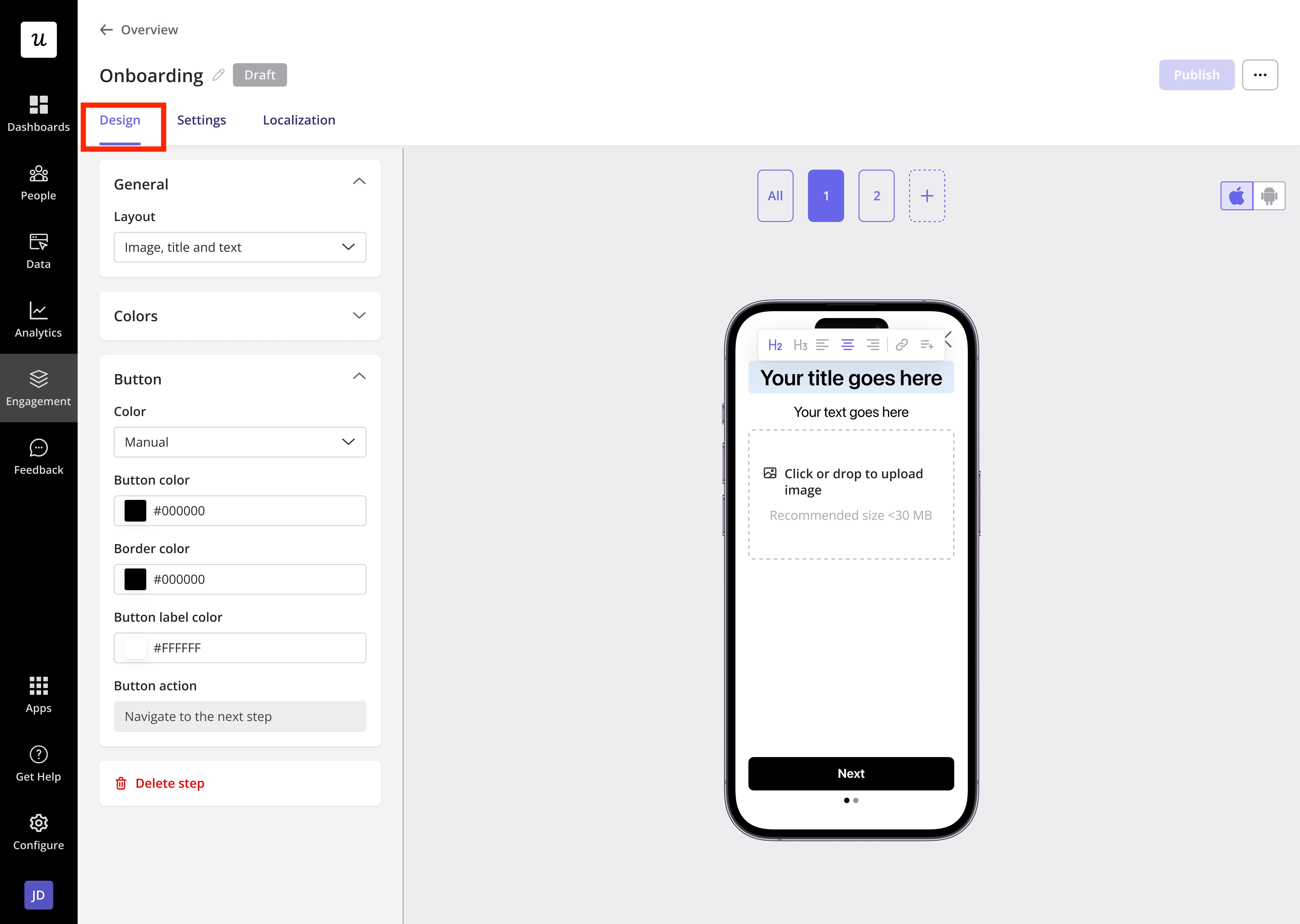 If your **audience** is from different locations, Userpilot lets you **localize** your mobile content to make it more **relevant** and **accessible** globally.
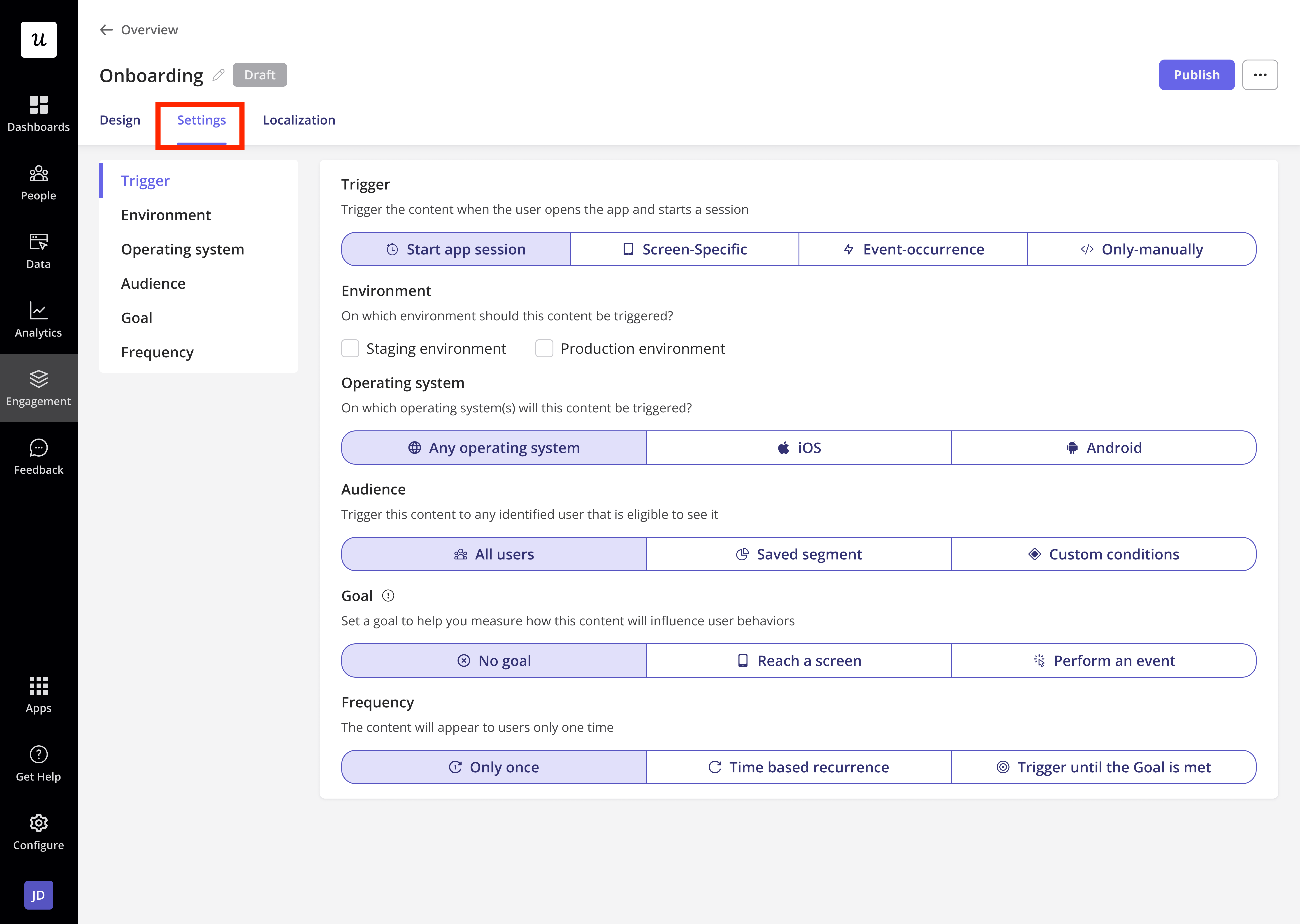
.png?fit=max&auto=format&n=0BXmctFYfQD3s2Lh&q=85&s=7d74cb3ef8ef7526cab46f346b9ed8f9) Once you're happy with your mobile content, head over to **Settings** to define on which **environment** you would like to show it, **who** should see it, and **when** it should appear.
Once you're happy with your mobile content, head over to **Settings** to define on which **environment** you would like to show it, **who** should see it, and **when** it should appear.
 Click **Publish** to make it live for your users.
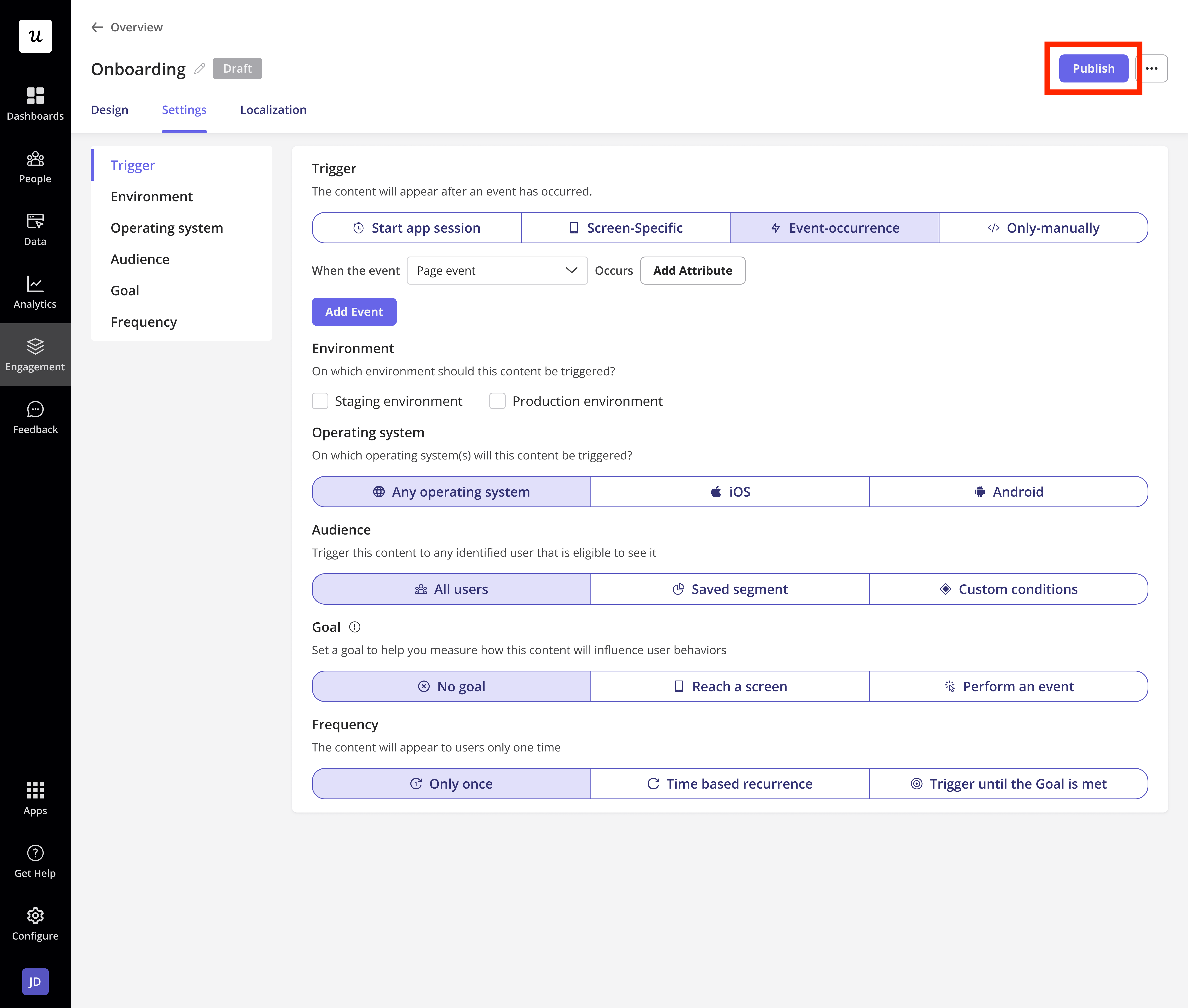 By following these steps, you can deliver consistent, personalized experiences to your mobile users with Userpilot.
## Mobile content role and permission
Userpilot gives you control over who can manage mobile content communication within your account.
By default, **Admin** users and the **Account Owner** have full permissions to create, edit, delete, and publish mobile content to customers.
For teams on the **Enterprise** plan, Userpilot offers advanced role management. You can create custom roles and assign specific permissions to teammates, allowing you to define who can:
* Create new mobile content
* Edit existing mobile content
* Delete mobile content
* Publish mobile content
* Export mobile content data
This flexibility ensures you maintain control over your content strategy while empowering the right team members to manage customer communications effectively.
**Users** on the **Growth** or **Starter** plans will need to **upgrade** to the **Enterprise** plan to create **custom roles** and enjoy the **flexibility** of assigning specific **permissions** across their organization. Feel free to reach out to our support team at [**support@userpilot.com**](mailto:support@userpilot.com).
### FAQs
No, you can simply create one mobile experience and trigger it on both Android and iOS devices.
Yes. In Settings, you can define the environment, the audience, and the trigger conditions so content appears to the right users at the right moment.
[For any questions or concerns please reach out to **support@userpilot.com**](mailto:support@userpilot.com)
By following these steps, you can deliver consistent, personalized experiences to your mobile users with Userpilot.
## Mobile content role and permission
Userpilot gives you control over who can manage mobile content communication within your account.
By default, **Admin** users and the **Account Owner** have full permissions to create, edit, delete, and publish mobile content to customers.
For teams on the **Enterprise** plan, Userpilot offers advanced role management. You can create custom roles and assign specific permissions to teammates, allowing you to define who can:
* Create new mobile content
* Edit existing mobile content
* Delete mobile content
* Publish mobile content
* Export mobile content data
This flexibility ensures you maintain control over your content strategy while empowering the right team members to manage customer communications effectively.
**Users** on the **Growth** or **Starter** plans will need to **upgrade** to the **Enterprise** plan to create **custom roles** and enjoy the **flexibility** of assigning specific **permissions** across their organization. Feel free to reach out to our support team at [**support@userpilot.com**](mailto:support@userpilot.com).
### FAQs
No, you can simply create one mobile experience and trigger it on both Android and iOS devices.
Yes. In Settings, you can define the environment, the audience, and the trigger conditions so content appears to the right users at the right moment.
[For any questions or concerns please reach out to **support@userpilot.com**](mailto:support@userpilot.com)