> ## Documentation Index
> Fetch the complete documentation index at: https://docs.userpilot.com/llms.txt
> Use this file to discover all available pages before exploring further.
# Segment Integration
> Integrate Userpilot with Segment to send Userpilot event data for analytics and automation
### **Overview**
The **Userpilot-Segment integration** enables you to send Userpilot event data to Segment, allowing for better analytics and cross-platform tracking. This integration helps you centralize user behavior data, analyze engagement, and integrate Userpilot insights into other tools connected to Segment.
With this integration, you can:\
✔ Send **Userpilot events** (e.g., flow completions, button clicks) to Segment.\
✔ Analyze Userpilot-driven engagement within your existing analytics stack.\
✔ Use Userpilot data in Segment-powered marketing automation and reporting.
This guide covers sending Userpilot data to Segment. If you're looking to install Userpilot via Segment and use Segment as a data source, refer to [this article](https://docs.userpilot.com/developer/installation/web).
### Use Cases
* Streamline event collection by automatically sending Userpilot data to Segment.
* Reduce reliance on manual event tracking or additional scripts.
* Use Segment to forward Userpilot data to analytics tools like **Mixpanel**, **Amplitude**, or **Google Analytics**.
* Gain deeper insights into user engagement with Userpilot experiences.
* Use Userpilot event data in Segment-powered marketing campaigns.
* Trigger emails, push notifications, or ads based on Userpilot interactions.
*
### **How the Integration Works**
**Outbound Data (Userpilot → Segment)**
* Userpilot sends user event data (e.g., flow starts, completions, button clicks) to Segment.
* Segment then distributes this data to your configured analytics, marketing, and data storage tools.
### **Setting Up the Integration**
Intercom integration can be enabled with a single click.
1. Go to **Configure** → [**Integrations**](https://run.userpilot.io/integrations/native-integration).
2. Find **Segment** and click on the box to **Enable Integration**. \\
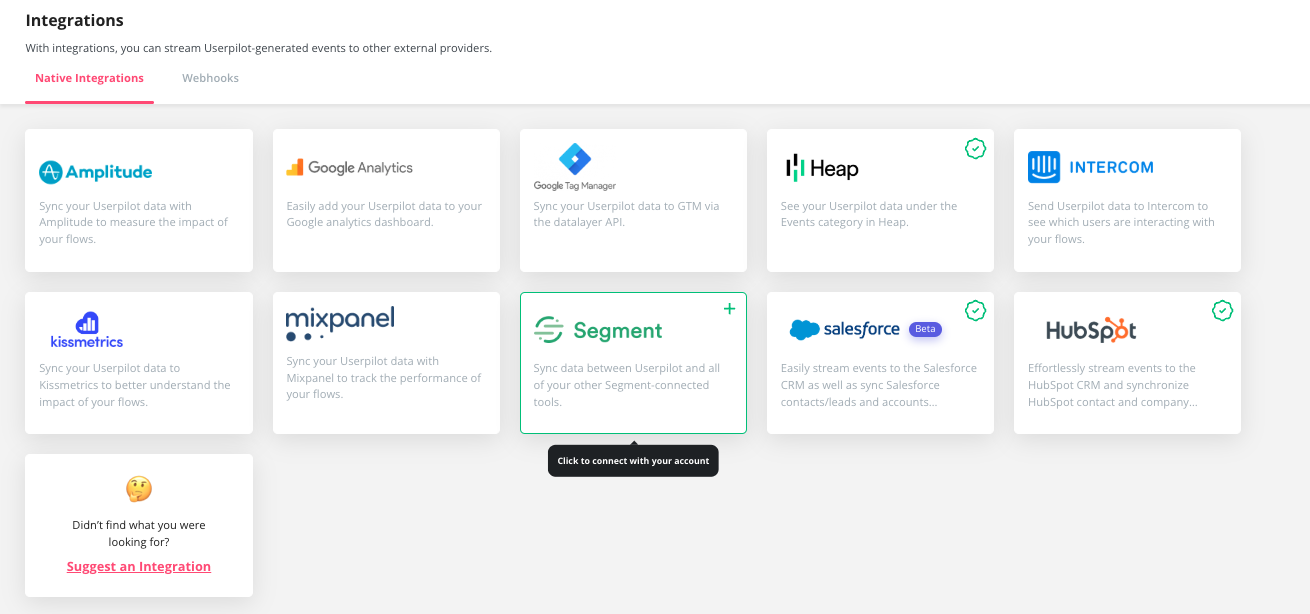 1. Open your **Segment Dashboard**.
2. Navigate to **Debugger** to check incoming events.
3. Confirm that Userpilot events (e.g., `flow_started`, `button_clicked`) appear correctly.
Events will start to appear in Segment after the integration is enabled, it will not pull historical data.
### **Userpilot Events Sent to Segment**
| **Event Name** | **Description** |
| :------------- | :----------------------------- |
| Flows | `Seen` `Completed` `Dismissed` |
| Checklists | `Seen` `Completed` `Dismissed` |
| Surveys | `Seen` `Submitted` `Dismissed` |
| NPS | `Ask Later` `Feedback` |
| Forms | `Submitted` |
### FAQs
Yes, you need both Segment and Userpilot fully installed on every page to track and send user data.
To use Segment as a data source and sync your Segment information (e.g. user and company attributes and event) to Userpilot, make sure you've [Installed Userpilot through segment](https://docs.userpilot.com/developer/installation/web).
For any questions or concerns please reach out to [support@userpilot.co](mailto:support@userpilot.com)
1. Open your **Segment Dashboard**.
2. Navigate to **Debugger** to check incoming events.
3. Confirm that Userpilot events (e.g., `flow_started`, `button_clicked`) appear correctly.
Events will start to appear in Segment after the integration is enabled, it will not pull historical data.
### **Userpilot Events Sent to Segment**
| **Event Name** | **Description** |
| :------------- | :----------------------------- |
| Flows | `Seen` `Completed` `Dismissed` |
| Checklists | `Seen` `Completed` `Dismissed` |
| Surveys | `Seen` `Submitted` `Dismissed` |
| NPS | `Ask Later` `Feedback` |
| Forms | `Submitted` |
### FAQs
Yes, you need both Segment and Userpilot fully installed on every page to track and send user data.
To use Segment as a data source and sync your Segment information (e.g. user and company attributes and event) to Userpilot, make sure you've [Installed Userpilot through segment](https://docs.userpilot.com/developer/installation/web).
For any questions or concerns please reach out to [support@userpilot.co](mailto:support@userpilot.com)