> ## Documentation Index
> Fetch the complete documentation index at: https://docs.userpilot.com/llms.txt
> Use this file to discover all available pages before exploring further.
# NPS Responses and Analytics
> Analyze NPS responses in Userpilot to understand customer sentiment, track loyalty trends, and take action based on promoters, passives, and detractors.
## Overview
Net Promoter Score (NPS) is a metric used to measure customer loyalty by assessing how likely users are to recommend your product. NPS responses help businesses segment customers into three categories:
* **Promoters (9-10):** Loyal customers who actively promote your product.
* **Passives (7-8):** Satisfied but not enthusiastic customers.
* **Detractors (0-6):** Dissatisfied customers who may churn and spread negative feedback.
The NPS score is calculated using the formula: **Score = % of Promoters - % of Detractors**
## Use Cases
* Identify promoters and detractors to assess overall satisfaction.
* Address detractors’ concerns before they leave.
* Compare NPS over time to evaluate updates.
* Tailor marketing efforts and customer support based on user feedback.
## NPS responses
Once you create an NPS survey, responses and data update on the NPS page. You can filter responses by **Segment, Company, Time Period, or Platform (mobile app, web app, or all platforms)** to analyze trends effectively.
 ### Key Metrics
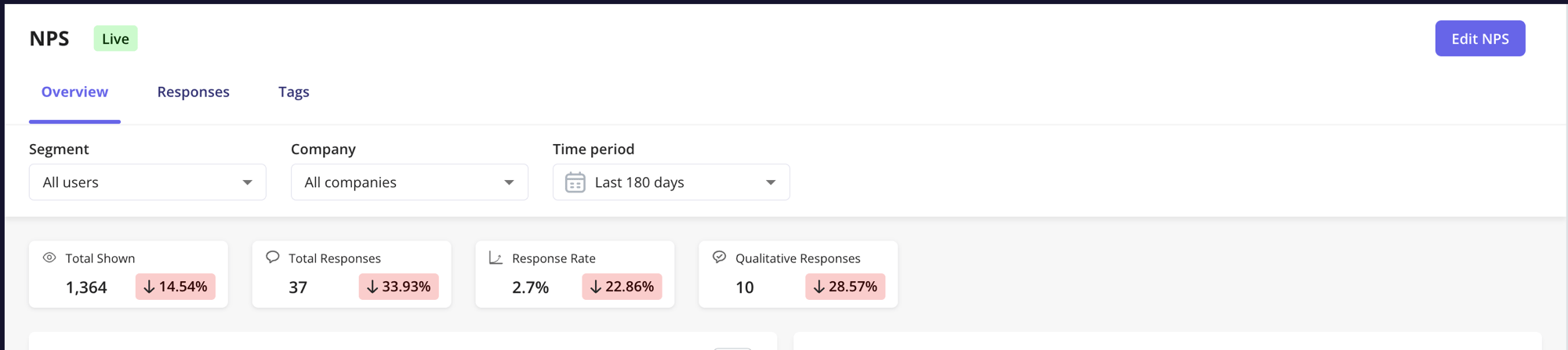
* **Total Shown:** Number of times the survey was displayed.
* **Total Responses:** Number of users who submitted a response.
* **Response Rate:** Percentage of users who responded (Total Responses / Total Shown \* 100).
* **Qualitative Responses:** Number of users who provided written feedback along with their score.
Click the **···** menu on the **Score** card to compare your NPS score against an **Industry** benchmark or set a custom **Benchmark** value.
### NPS history chart
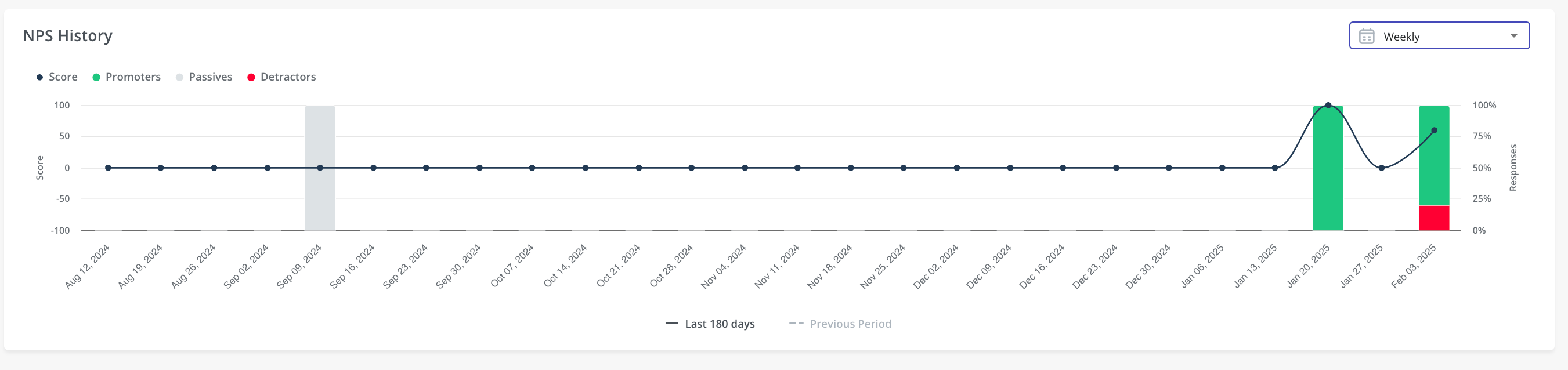
The **NPS History Chart** tracks score trends over time. Hover over data points for detailed insights. You can also compare different time periods to evaluate how product updates impact user satisfaction.
### Key Metrics
* **Total Shown:** Number of times the survey was displayed.
* **Total Responses:** Number of users who submitted a response.
* **Response Rate:** Percentage of users who responded (Total Responses / Total Shown \* 100).
* **Qualitative Responses:** Number of users who provided written feedback along with their score.
Click the **···** menu on the **Score** card to compare your NPS score against an **Industry** benchmark or set a custom **Benchmark** value.
### NPS history chart
The **NPS History Chart** tracks score trends over time. Hover over data points for detailed insights. You can also compare different time periods to evaluate how product updates impact user satisfaction.
 ### Responses breakdown
#### Filtering Options
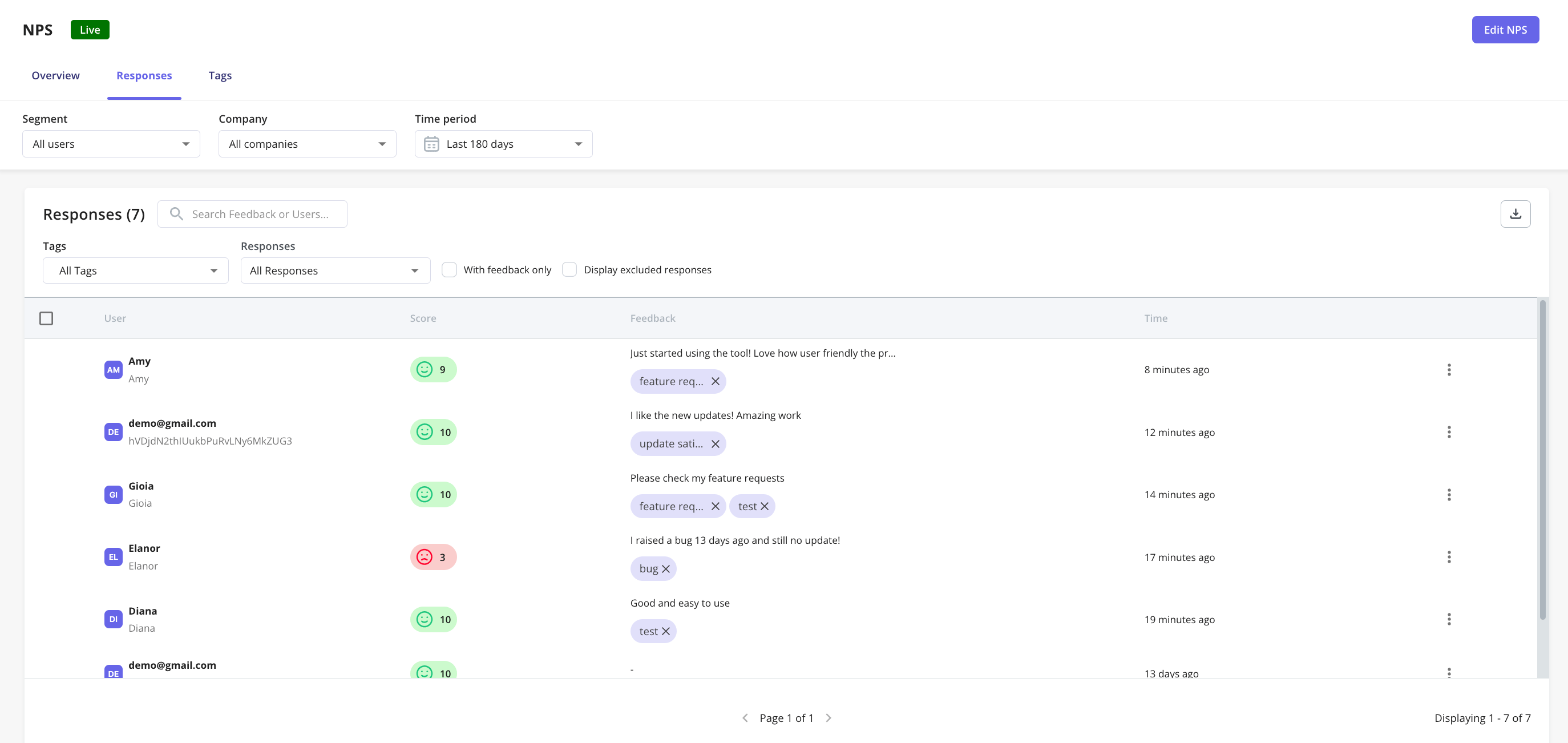
* **Tags:** Categorize responses based on custom labels.
* **Response Type:** Filter by **Promoters, Passives, or Detractors**.
* **With Feedback Only:** Show only responses that include written feedback.
* **Display Excluded Responses:** View responses removed from NPS calculations.
### Responses breakdown
#### Filtering Options
* **Tags:** Categorize responses based on custom labels.
* **Response Type:** Filter by **Promoters, Passives, or Detractors**.
* **With Feedback Only:** Show only responses that include written feedback.
* **Display Excluded Responses:** View responses removed from NPS calculations.
 **Note**
NPS is not designed to be triggered multiple times per day, except for testing, because repeated submissions from the same user can distort the overall NPS score. To align with industry-standard NPS practices, if a user submits multiple responses on the same day, only the most recent submission is counted.
However, all NPS responses are still visible in both the table and the exported file based on the selected time-period filter.
If your use case requires collecting multiple responses from the same user in a single day, we recommend using a standard [survey](https://docs.userpilot.com/user-feedback/surveys/create-survey) instead.
### Response actions menu
**Excluding responses**
Excluded responses are removed from NPS analytics, which is useful for filtering out test responses.
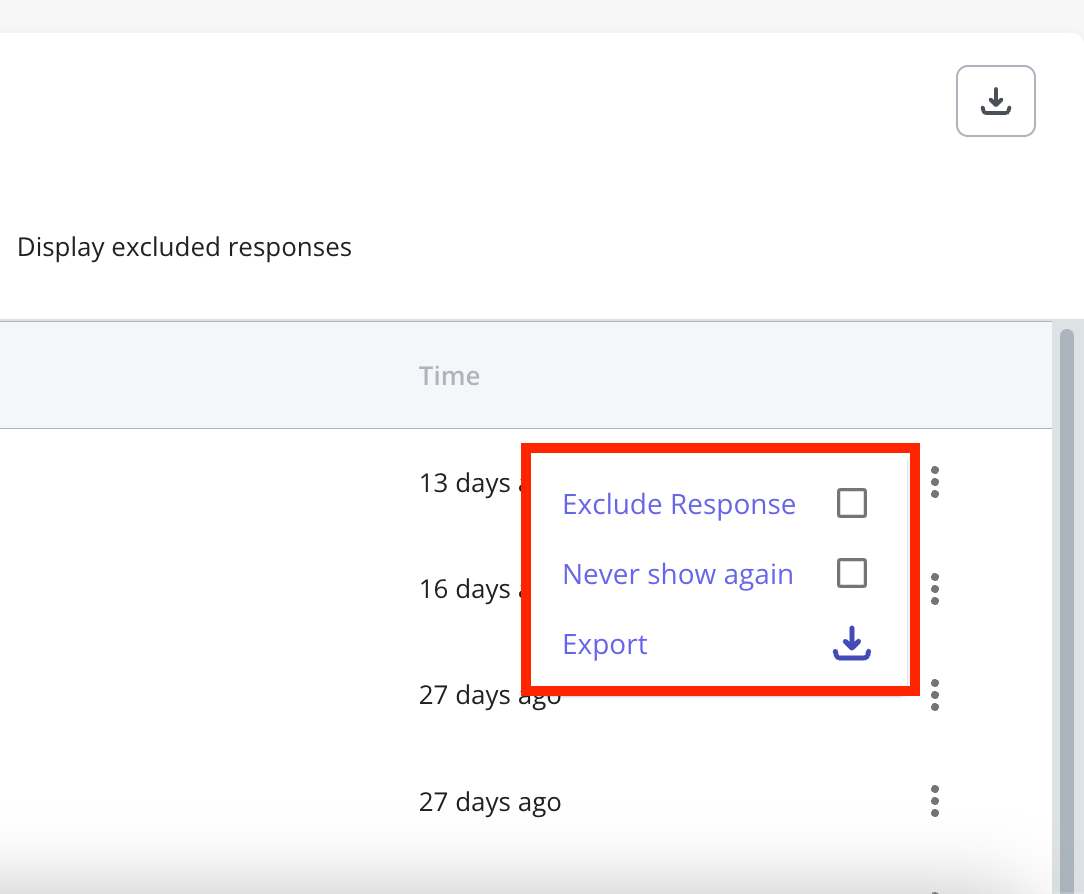
1. Click the three-dot menu on the response.
2. Select **Exclude Response**.
**Never Show Again**
Enable this option to prevent specific users from seeing the NPS survey in the future. This setting does not exclude existing responses from analytics.
**Exporting NPS Data**
You can download NPS responses in **CSV format**:
* Click **Export Data** to download all responses.
* To export a single response, click the three-dot menu next to it and select **Export**.
Each export includes **Survey Question, Score, Follow-up Question, Feedback, Tags, Submitted At,** and **Platform**, plus any User properties you choose.
**Note**
NPS is not designed to be triggered multiple times per day, except for testing, because repeated submissions from the same user can distort the overall NPS score. To align with industry-standard NPS practices, if a user submits multiple responses on the same day, only the most recent submission is counted.
However, all NPS responses are still visible in both the table and the exported file based on the selected time-period filter.
If your use case requires collecting multiple responses from the same user in a single day, we recommend using a standard [survey](https://docs.userpilot.com/user-feedback/surveys/create-survey) instead.
### Response actions menu
**Excluding responses**
Excluded responses are removed from NPS analytics, which is useful for filtering out test responses.
1. Click the three-dot menu on the response.
2. Select **Exclude Response**.
**Never Show Again**
Enable this option to prevent specific users from seeing the NPS survey in the future. This setting does not exclude existing responses from analytics.
**Exporting NPS Data**
You can download NPS responses in **CSV format**:
* Click **Export Data** to download all responses.
* To export a single response, click the three-dot menu next to it and select **Export**.
Each export includes **Survey Question, Score, Follow-up Question, Feedback, Tags, Submitted At,** and **Platform**, plus any User properties you choose.
 ## Tags
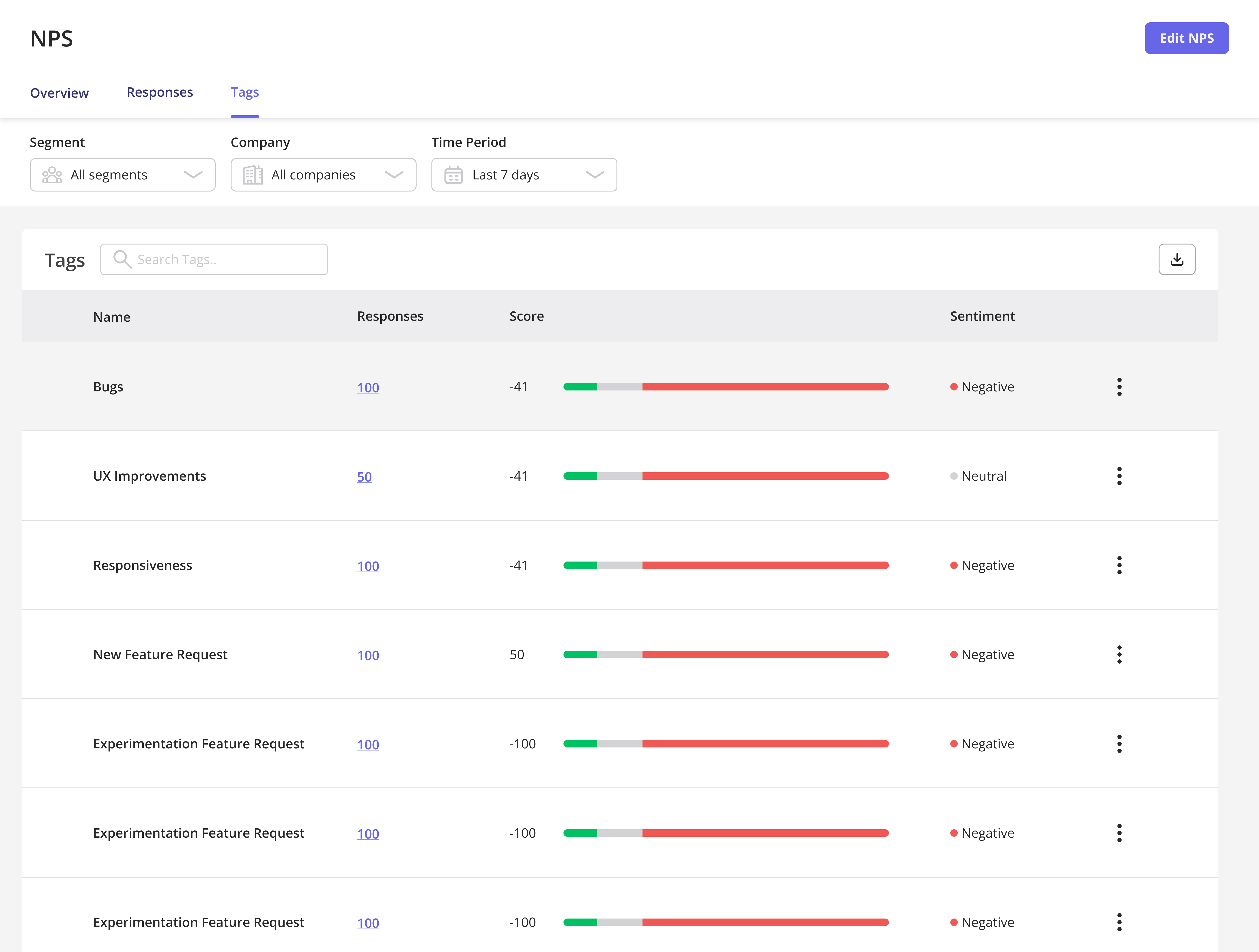
NPS tags tab helps categorize responses for better analysis.
**Tags Overview**
* **Name:** Rename tags via the three-dot menu.
* **Responses:** View the number of responses associated with a tag.
* **Score Breakdown:** A graphical representation of Promoters (green), Passives (grey), and Detractors (red).
## Tags
NPS tags tab helps categorize responses for better analysis.
**Tags Overview**
* **Name:** Rename tags via the three-dot menu.
* **Responses:** View the number of responses associated with a tag.
* **Score Breakdown:** A graphical representation of Promoters (green), Passives (grey), and Detractors (red).
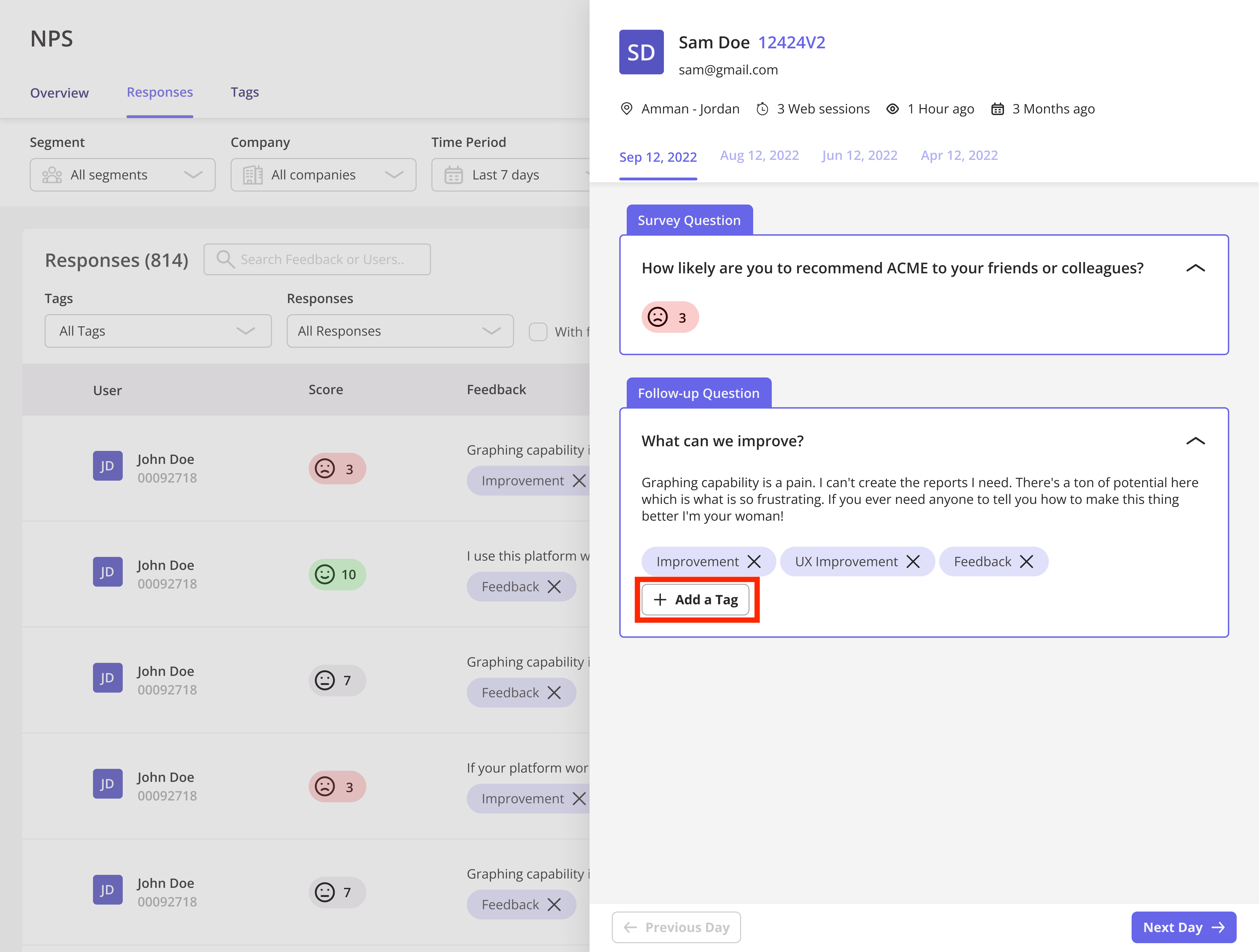
 **Creating a Tag**
1. Go to the **Responses** tab.
2. Click **+ Add a tag**.
3. Enter a name or select an existing tag.
**Creating a Tag**
1. Go to the **Responses** tab.
2. Click **+ Add a tag**.
3. Enter a name or select an existing tag.
 ## FAQs
It is removed from NPS analytics but remains visible in the response log.
A user doesn't have to submit text feedback for the score to be counted. If someone submits an NPS score without a response, it re-triggers after 60 days; 60 days is the default setting and can be changed.
Address detractor concerns, engage passives, and reward promoters for referrals.
[For any questions or concerns please reach out to **support@userpilot.com**](mailto:support@userpilot.com)
## FAQs
It is removed from NPS analytics but remains visible in the response log.
A user doesn't have to submit text feedback for the score to be counted. If someone submits an NPS score without a response, it re-triggers after 60 days; 60 days is the default setting and can be changed.
Address detractor concerns, engage passives, and reward promoters for referrals.
[For any questions or concerns please reach out to **support@userpilot.com**](mailto:support@userpilot.com)