> ## Documentation Index
> Fetch the complete documentation index at: https://docs.userpilot.com/llms.txt
> Use this file to discover all available pages before exploring further.
# Profiles
> User & Company Profiles provide detailed insights into the individuals who are interacting with your platform. These individualised profiles help you understand user behaviour, segment users and companies effectively, and deliver personalised in-app experiences.
## User Profile
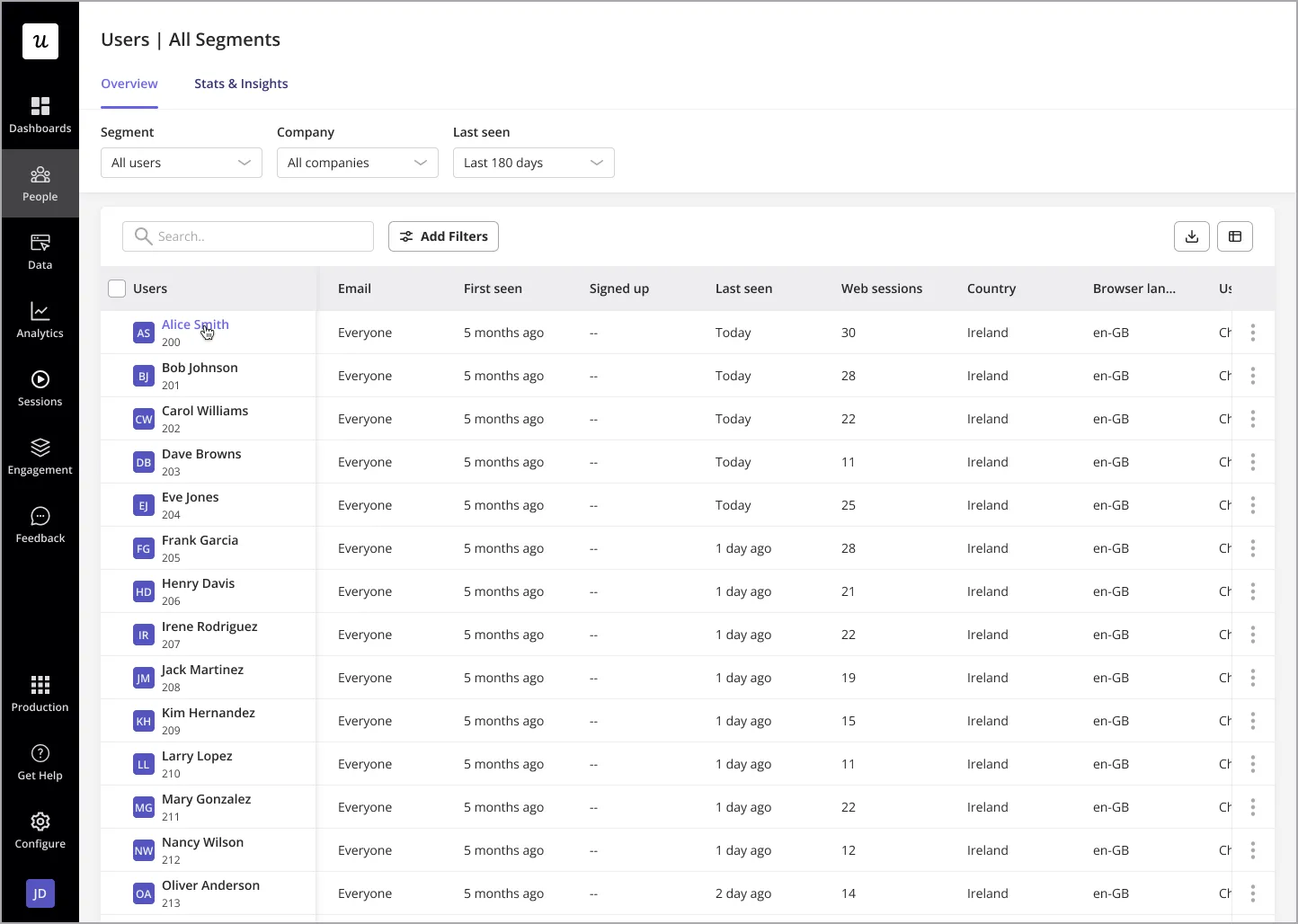
To access a user’s profile, simply click on the desired user from your users’ dashboard or any location where user data is displayed.
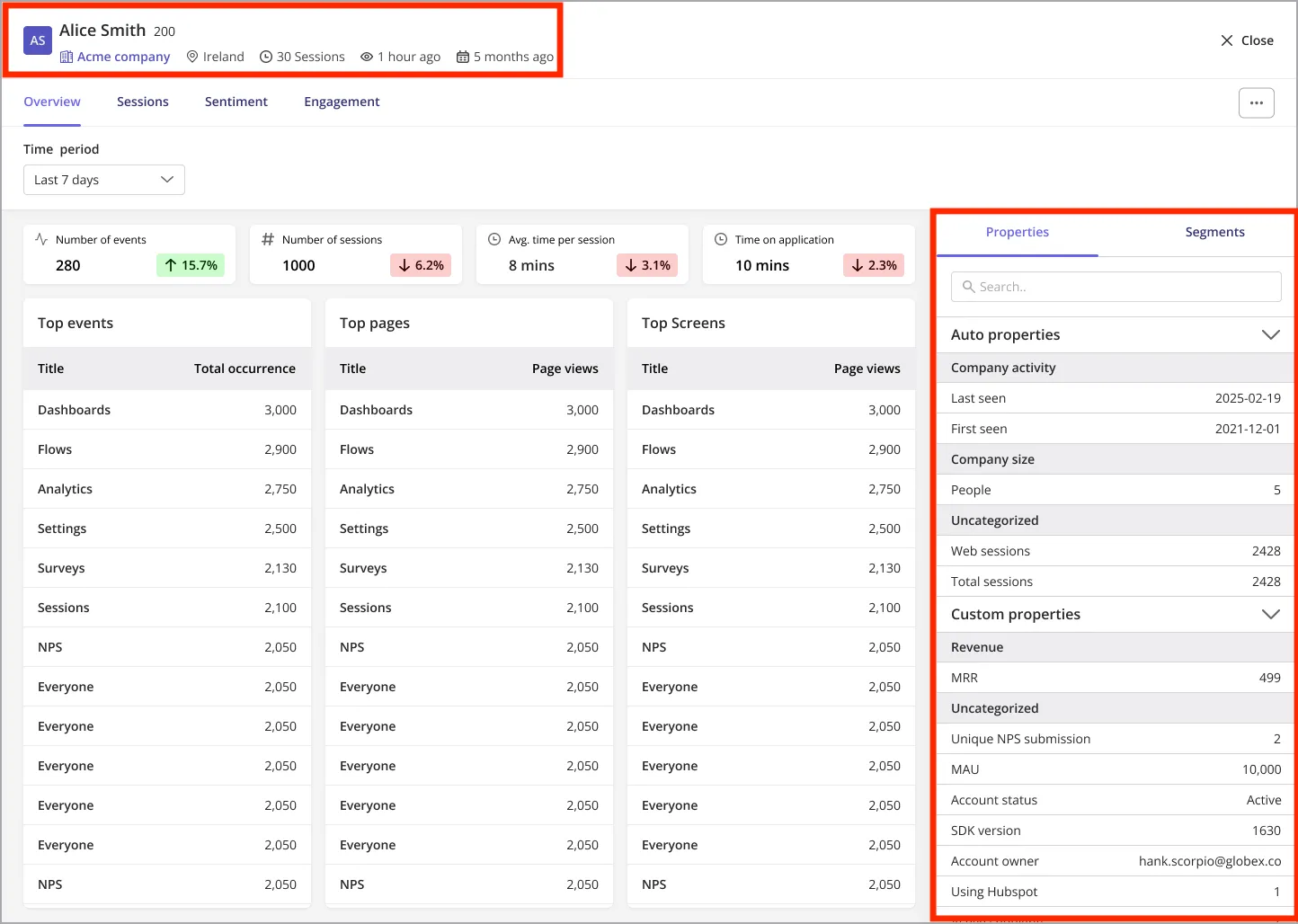
 At the top of each user’s profile, you’ll find essential user details, including:
* **Name & User ID**
* **Country**
* **Total sessions**
* **Last seen date**
* **Sign-up date**
* **Company name**
If the **Sign-up Date** is not available, the "First Seen" date will be displayed
All of the users’ other details, including their property data (as of last state) and the segments they currently belong to, can be found within their corresponding tabs.
At the top of each user’s profile, you’ll find essential user details, including:
* **Name & User ID**
* **Country**
* **Total sessions**
* **Last seen date**
* **Sign-up date**
* **Company name**
If the **Sign-up Date** is not available, the "First Seen" date will be displayed
All of the users’ other details, including their property data (as of last state) and the segments they currently belong to, can be found within their corresponding tabs.
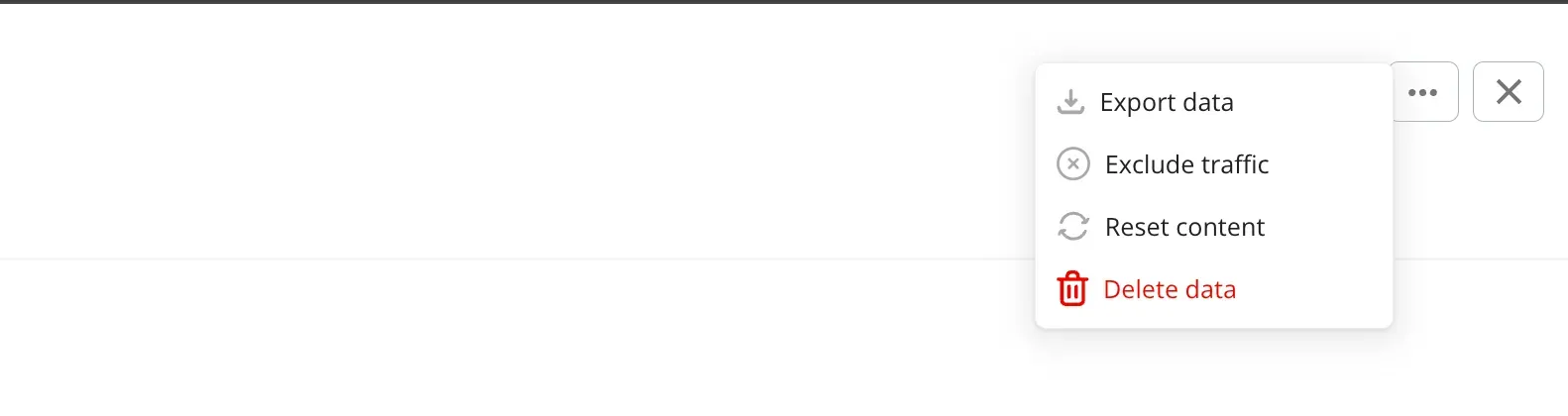
 From the user's profile, you can also:
* **Export data**: Allows you to download a comprehensive report of the user’s information and activity in CSV format for further analysis.
* **Exclude traffic:** This option removes the user’s data from analytics calculations, ensuring they do not impact aggregated insights and reports.
* **Reset content:** Resets the user’s progress within the product, allowing them to experience content as a first-time user.
* **Delete data:** Permanently removes all of the user’s data from the Userpilot account.
From the user's profile, you can also:
* **Export data**: Allows you to download a comprehensive report of the user’s information and activity in CSV format for further analysis.
* **Exclude traffic:** This option removes the user’s data from analytics calculations, ensuring they do not impact aggregated insights and reports.
* **Reset content:** Resets the user’s progress within the product, allowing them to experience content as a first-time user.
* **Delete data:** Permanently removes all of the user’s data from the Userpilot account.
 The user profile is organized into four main tabs, each providing valuable insights:
### 1. Overview
The overview tab provides a summary of key user statistics based on the ‘Time Period’ specified, including:
* **Total events occurred**: A count of all tracked events, labeled events, and feature tag occurrences.
* **Number of sessions**: Total number of sessions initiated by the user.
* **Average time per session**: The average length of the users’ sessions.
* **Top Events & Pages**: Displays the most frequently occurring events and visited pages. A search function is available to find the data for specific events or pages beyond the displayed top ones.
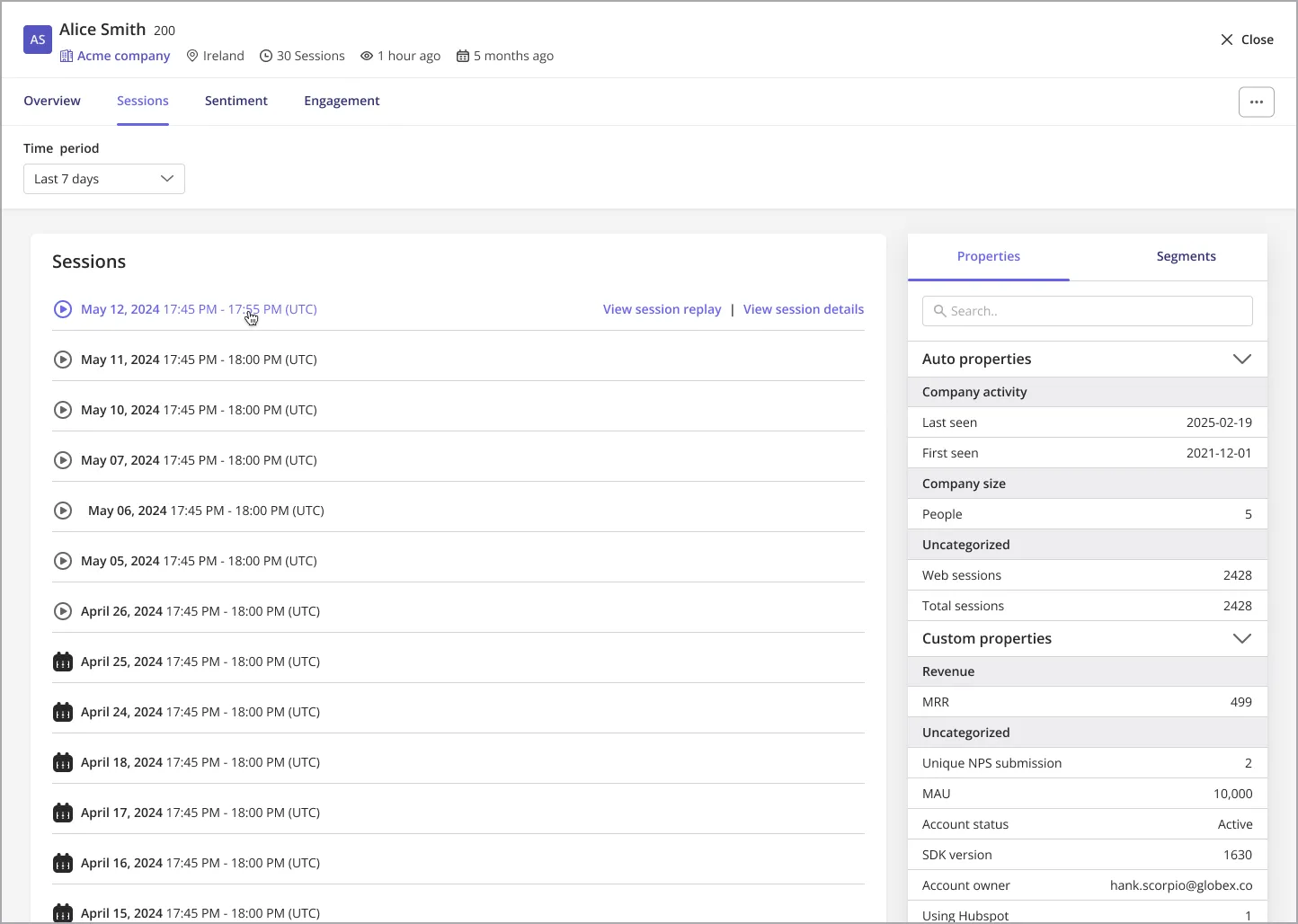
### 2. Sessions
This tab lists all of the users’ sessions, including the dates and times of each. From here, you can access the corresponding session replay, if available, or further session details.
The user profile is organized into four main tabs, each providing valuable insights:
### 1. Overview
The overview tab provides a summary of key user statistics based on the ‘Time Period’ specified, including:
* **Total events occurred**: A count of all tracked events, labeled events, and feature tag occurrences.
* **Number of sessions**: Total number of sessions initiated by the user.
* **Average time per session**: The average length of the users’ sessions.
* **Top Events & Pages**: Displays the most frequently occurring events and visited pages. A search function is available to find the data for specific events or pages beyond the displayed top ones.
### 2. Sessions
This tab lists all of the users’ sessions, including the dates and times of each. From here, you can access the corresponding session replay, if available, or further session details.
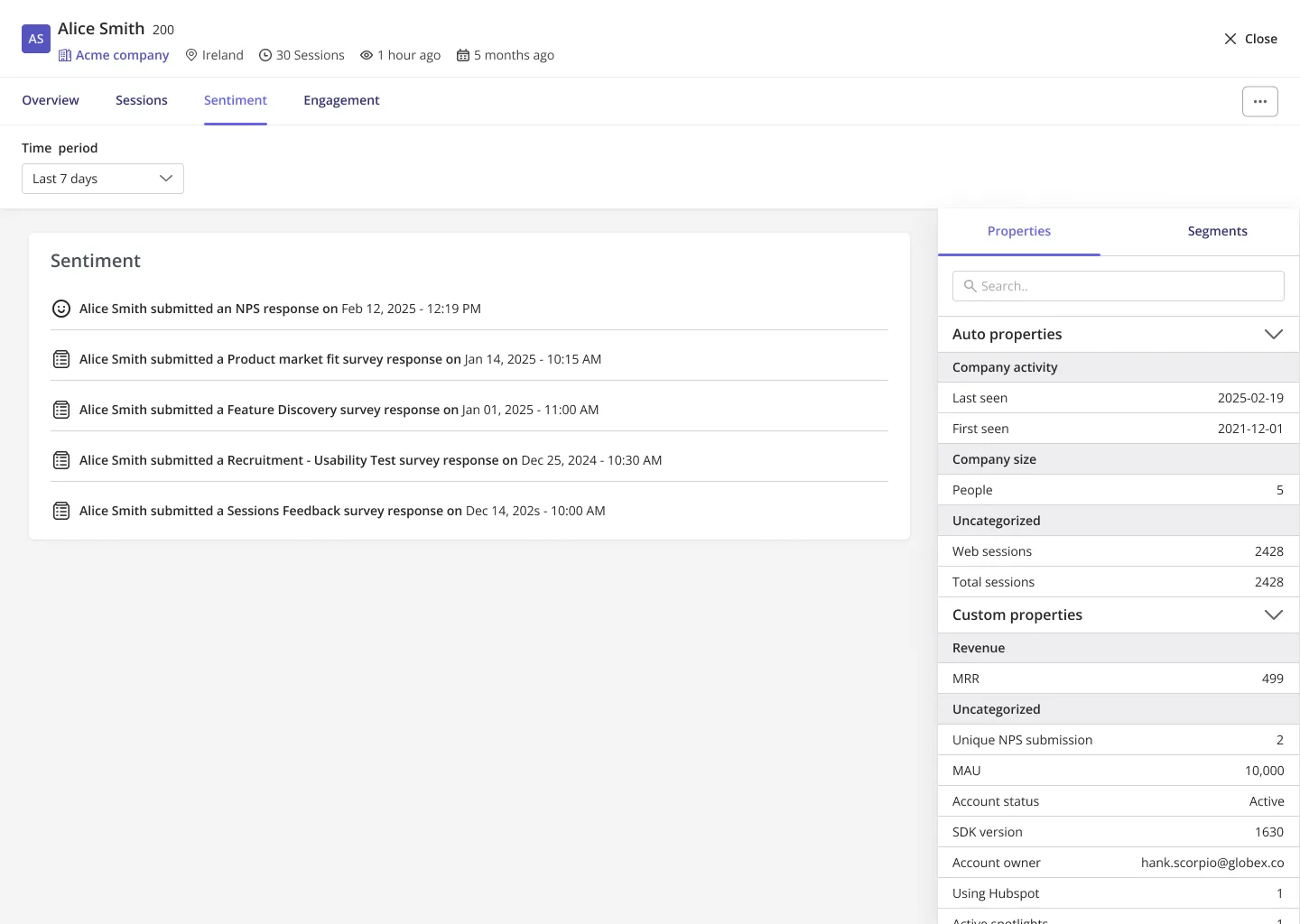
 ### 3. Sentiment
Here, you can find the feedback provided by the user within the specified time period, including:
* **NPS (Net Promoter Score) and Survey Responses**: Clicking on a response provides more details on the specific feedback provided by the user.
### 3. Sentiment
Here, you can find the feedback provided by the user within the specified time period, including:
* **NPS (Net Promoter Score) and Survey Responses**: Clicking on a response provides more details on the specific feedback provided by the user.
 ### 4. Engagement
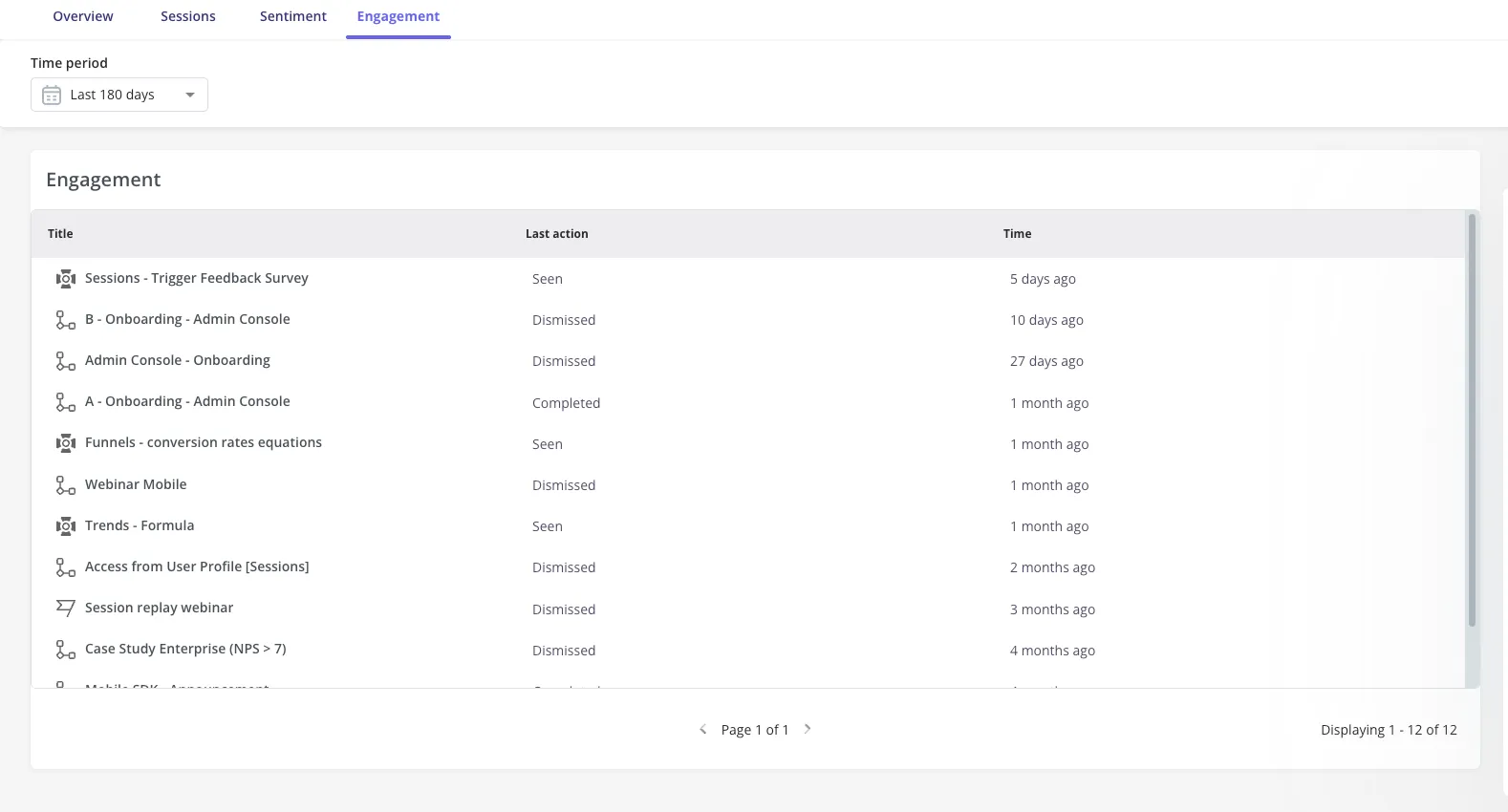
All of the user’s interactions with in-app content are listed here, including:
* **Flows, Spotlights, Banners, and Checklists**
* **Last Action Performed & Timestamp:** Clicking on an engagement reveals specific details such as the event (i.e., how the user interacted with the content), time the interaction occurred on, and the page the user was on at the time of interaction.
### 4. Engagement
All of the user’s interactions with in-app content are listed here, including:
* **Flows, Spotlights, Banners, and Checklists**
* **Last Action Performed & Timestamp:** Clicking on an engagement reveals specific details such as the event (i.e., how the user interacted with the content), time the interaction occurred on, and the page the user was on at the time of interaction.
 ## Company Profile
Similar to the user profile, clicking on a company name from anywhere within Userpilot navigates you to its profile page.
At the top of each company’s profile, you’ll find essential company details, including:
* **Name & Company ID**
* **Total sessions**
* **Last seen date**
* **Sign-up date**
If the **Sign-up Date** is not available, the “First Seen” date will be displayed
All of the company’s other details, including their property data (as of the last state) and the segments they currently belong to, can be found within their corresponding tabs.
The company profile is split between two tabs:
### 1. Overview
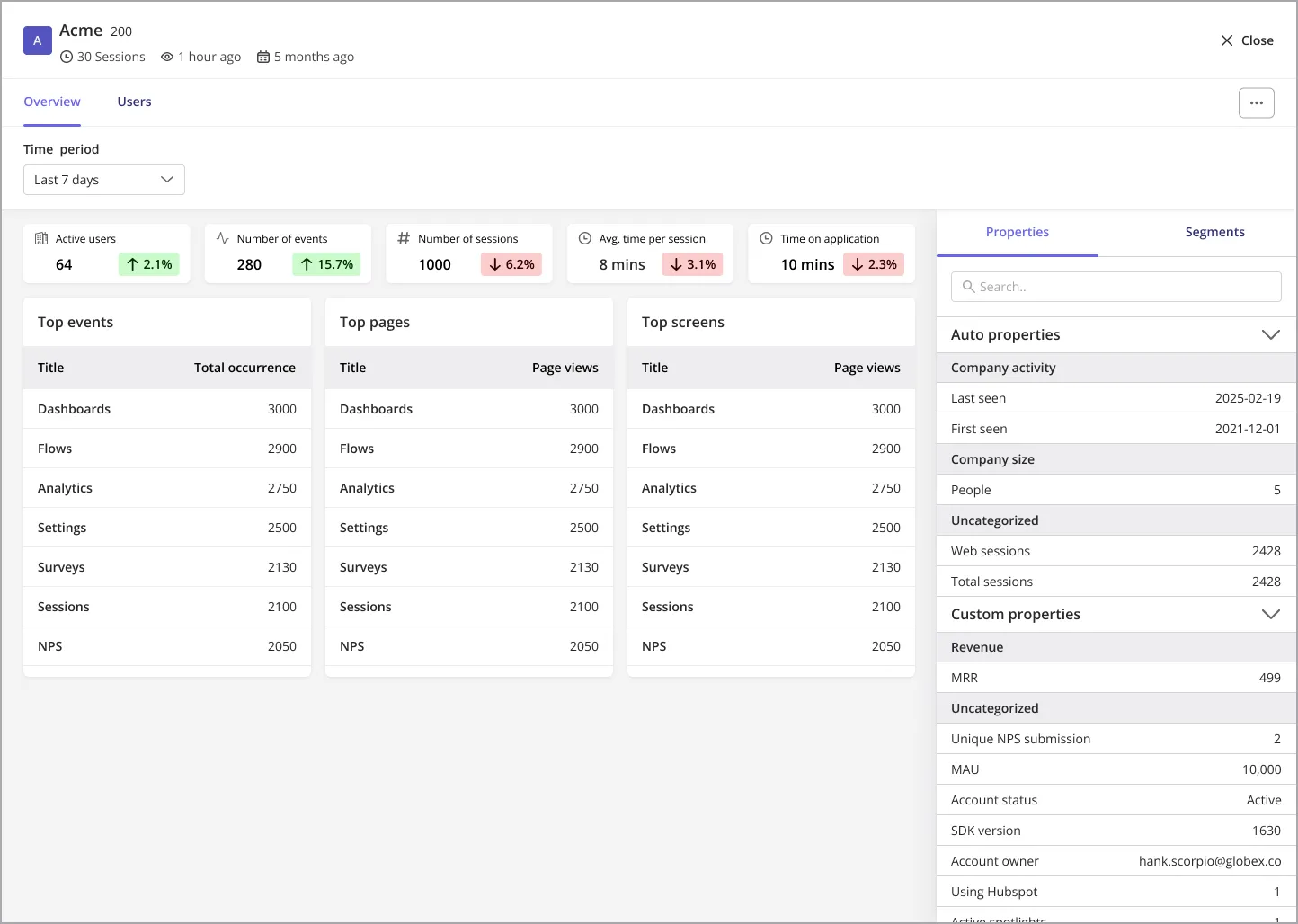
The overview tab provides a summary of key company statistics based on the ‘Time Period’ specified, including:
* **Number of users:** The count of users identified who are associated with the company.
* **Total events occurred**: The sum of all tracked events, labeled events, and feature tag occurrences by any user within the company.
* **Number of sessions:** Total number of sessions carried out by all users within the company.
* **Average time per session:** The aggregated average length of a session from all users within the company.
* **Top Events & Pages**: Displays the most frequently occurring events and visited pages. A search function is available to find the data for specific events or pages beyond the displayed top ones.
### 2. Users
Here, you can find the list of all users who are associated with the company. Clicking a user will redirect you to their profile.
## Company Profile
Similar to the user profile, clicking on a company name from anywhere within Userpilot navigates you to its profile page.
At the top of each company’s profile, you’ll find essential company details, including:
* **Name & Company ID**
* **Total sessions**
* **Last seen date**
* **Sign-up date**
If the **Sign-up Date** is not available, the “First Seen” date will be displayed
All of the company’s other details, including their property data (as of the last state) and the segments they currently belong to, can be found within their corresponding tabs.
The company profile is split between two tabs:
### 1. Overview
The overview tab provides a summary of key company statistics based on the ‘Time Period’ specified, including:
* **Number of users:** The count of users identified who are associated with the company.
* **Total events occurred**: The sum of all tracked events, labeled events, and feature tag occurrences by any user within the company.
* **Number of sessions:** Total number of sessions carried out by all users within the company.
* **Average time per session:** The aggregated average length of a session from all users within the company.
* **Top Events & Pages**: Displays the most frequently occurring events and visited pages. A search function is available to find the data for specific events or pages beyond the displayed top ones.
### 2. Users
Here, you can find the list of all users who are associated with the company. Clicking a user will redirect you to their profile.
 ## FAQs
A session starts when a user interacts with your app after being inactive for more than 30 minutes. A session can last multiple hours. The average session duration is calculated by dividing the total time spent across sessions by the number of sessions.
Yes, you can track this information within the User Profile under the Sessions tab, where the event breakdown will show page details.
Yes, session duration details can be found in the Session tab under the User Profile.
Yes, you can export user data by clicking the 'Export data' button. However, this will only include general information like last seen, total sessions, hostname, and other auto-detected properties. Session data, engagements, and other tab details are not included. Currently, there's no API available to mass export all data, but our team is working on this feature.
Excluding a user from traffic ensures their data does not affect analytics reports, useful for internal or test users.
For any questions or concerns please reach out to [support@userpilot.com](mailto:support@userpilot.com)
## FAQs
A session starts when a user interacts with your app after being inactive for more than 30 minutes. A session can last multiple hours. The average session duration is calculated by dividing the total time spent across sessions by the number of sessions.
Yes, you can track this information within the User Profile under the Sessions tab, where the event breakdown will show page details.
Yes, session duration details can be found in the Session tab under the User Profile.
Yes, you can export user data by clicking the 'Export data' button. However, this will only include general information like last seen, total sessions, hostname, and other auto-detected properties. Session data, engagements, and other tab details are not included. Currently, there's no API available to mass export all data, but our team is working on this feature.
Excluding a user from traffic ensures their data does not affect analytics reports, useful for internal or test users.
For any questions or concerns please reach out to [support@userpilot.com](mailto:support@userpilot.com)