

Overview
The Conversation Transcript View gives you a full-screen read of a single agent conversation, laid out alongside the user’s context (page, company, platform) and the specific signals detected within it.Use Cases
- Investigate a support case or complaint by reading the exact exchange between a user and the agent.
- Audit agent quality by reviewing conversations flagged with a failure or frustration signal.
- Verify a session replay or export a conversation for further review outside Userpilot.
Getting Started
You can open a full conversation transcript from three places:- A conversation row inside a Topics slideout.
- A conversation row inside a Failure signals slideout.
- A conversation row in a user’s Conversations tab on their profile.
What you can do from here
- Follow the exchange exactly as it happened — every prompt and reply in order, including if the user changed page mid-conversation, and how long the agent took to respond to each message.
- Understand who you’re looking at, without leaving the page — the user’s identity, company, platform, and location sit alongside the conversation, and you can jump straight to their profile.
- Tell whether this is a one-off or a pattern — see how many other conversations match the same topic or failure signal, or pull up everything else this user has talked to the agent about.
- Jump straight to the moments that matter — filter down to just the positive or negative feedback, frustration, failure, or slow-response moments in the conversation, instead of reading the whole thing to find them.
- Search within a long conversation to find a specific word or phrase without scrolling.
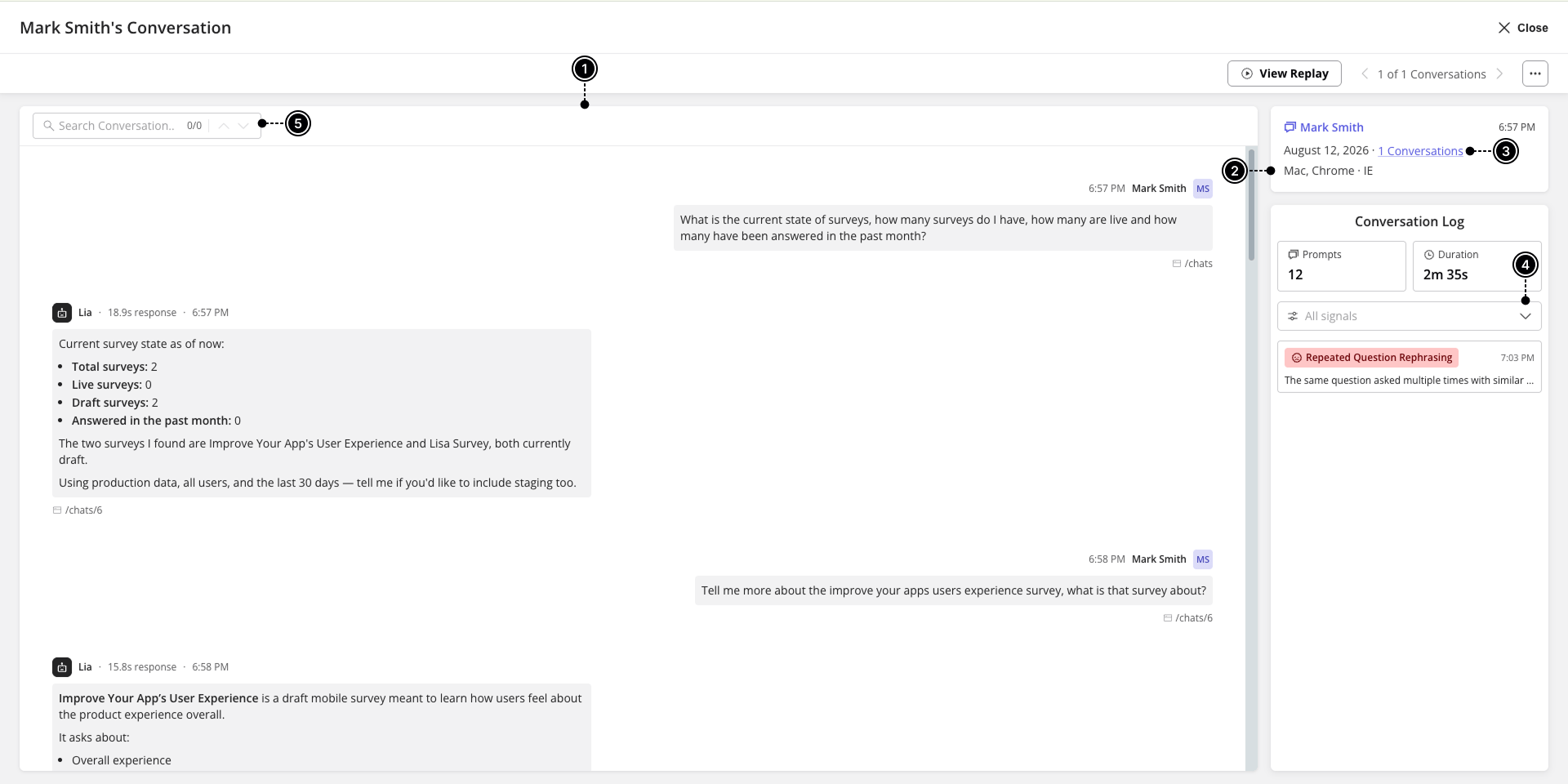
- Signals identified throughout a conversation include:
Data capture and privacy settings
From the Data Capture & Privacy Settings page, you can turn capture of conversation content on or off separately for production and staging, and set rules to keep sensitive data out of what’s stored — useful if your agent might encounter things like card numbers or other PII in the course of a conversation.- Exclude keywords – define a keyword or phrase to watch for. Any message that matches is masked within the conversation — since a keyword alone can’t reliably bound where a sensitive value starts and ends — and you can scope this to user messages, agent messages, or both.
FAQs
Can I export a single conversation?
Can I export a single conversation?
Yes — use Export data from the Actions menu in the transcript view.